Breaking

Showing posts with label Raspberry. Show all posts

Wednesday, March 13, 2019

3/13/2019 05:12:00 PM

Google's Raspberry Pi-like Coral board lands: Turbo-charged AI on a tiny computer

Google's own developer board helps developers bring machine-learning models to the network edge.


The baseboard has a Raspberry Pi-like 40-pin GPIO expansion header, microSD slot for flash memory, USB ports, Gigabit Ethernet port, USB 2.0 and 3.0 ports for power and peripherals, a 3.5mm audio jack, and a terminal to wire up stereo speakers.

Developers can now get their hands on Google's souped-up answer to the Raspberry Pi: the $150 Coral Dev Board, which features Google's Edge TPU machine-learning accelerator for low-powered devices that sit on the edge of a network.

Google unveiled the tiny Edge TPU ASIC last July as its low-cost chip for bringing machine learning to sensors that can run machine-learning models on the TensorFlow lite framework.

The Edge TPU now features in the Coral-branded $75 USB 'thumb drive' accelerator and as part of a removable 'system on module' that ships with a developer baseboard.

The Edge TPU Module includes an NXP i.MX 8M system on a chip that consists of a quad-core Cortex-A53 and Cortex-M4F, a Vivante GC7000 Lite Graphics graphics processor, 8GB of eMMC storage, and 1GB of LDDR4 RAM. It also features Wi-Fi with 2x2 MIMO (802.11b/g/n/ac 2.4/5GHz) and Bluetooth 4.1. The add-on measures 48mm x 40mm x 5mm.

The baseboard has an RPi-like 40-pin GPIO expansion header, microSD slot for flash memory, USB ports, Gigabit Ethernet port, USB 2.0 and 3.0 ports for power and peripherals, a 3.5mm audio jack, and a terminal to wire up stereo speakers. It measures 88mm x 60mm x 24mm. There's of course video and camera interfaces for computer-vision applications.

Google also launched a $25 five-megapixel Coral Camera Module that connects to the Dev Board via a camera flex cable.

SEE: Sensor'd enterprise: IoT, ML, and big data (ZDNet special report) | Download the report as a PDF (TechRepublic)

Get access to content exclusively curated for you
Build your personalized Google Cloud learning experience and get access to exclusive content, industry insights and more.

Sponsored by Google 

Google notes that the Dev Board can be used as a single-board computer with accelerated machine-learning processing, but it also serves as an evaluation kit for manufacturers who want to use just the SOM combined with their own custom PCB hardware.

The Edge TPU-powered SOM will be capable of executing "state-of-the-art mobile vision models such as MobileNet v2 at 100+ fps, in a power efficient manner", according to Google.

According to Hackster.io, Google plans to reveal more about the developer board and USB device at the TensorFlow Dev Summit, which kicks off today.

As Hackster.io notes, the Edge TPU devices would be used in the second stage of developing a machine-learning algorithm after it has already been trained on a large dataset. Developers could then run already trained devices nearer to the data and have devices that use machine learning without the cloud. 


READ MORE

Saturday, February 16, 2019

2/16/2019 11:33:00 PM

Superfast Raspberry Pi rival: Odroid N2 promises blistering speed for the only 2x price

Hardkernel's Odroid N2 promises great performance for its price.


Hardkernel failed to deliver the $100 Rockchip RK3399-based Odroid-N1 developer board last year due to component shortages. But it's now back with a successor, the Odroid-N2, which is cheaper and performs significantly better in benchmarking tests.

Best Presidents' Day 2019 deals: XPS 13, iPad, Apple Watch, Echo, Samsung TV, and more
The Odroid-N2 won't be as cheap as the $35 Raspberry Pi, but it's also intended for a different market that's willing to pay for some extra memory, more ports, and a faster processor.

The 2GB DDR4 RAM model will cost $63, while a 4GB DDR4 RAM model costs $79. Notably, these figures are still well below the $100 price that Hardkernel had planned for the Rockchip-based Odroid-N1.

Instead of a Rockchip processor, the N2 will come with an Amlogic S922X processor, consisting of a four-core 1.8GHz Cortex-A73 processor, a dual-core 1.9GHz Cortex-A53 processor, and a new Mali-G52 GPU.       

It also features a generous four USB 3.0 ports, one USB 2.0 port, a 40-pin expansion header for peripherals, Gigabit Ethernet, HDMI 2.0, a micro USB 2.0 port, two LED indicators, an infrared receiver, an eMMC flash module socket, microSD card slot, and bootable 8MB SPI flash memory.

There's also an active cooling fan connector and Real-Time Clock (RTC) backup battery connector. Hardkernel says the device's low power consumption means the RTC should be able to run for over a decade on a tiny CR2032 backup battery.

There's no integrated Wi-Fi, but users will have the option to add this via USB adapters. Hardkernel says its got hardware to accelerate video decoder that can play 4K H.265 at 60FPS.


If Hardkernel's benchmarks are to be believed, the Odroid-N2 should significantly outperform the Raspberry Pi 3 and the never-released Odroid N-1.

It also describes the Odroid-N2's CPU multi-core performance as about 20 percent faster than the Odroid-N1, its DDR4 RAM is 35 percent faster than the N1's DDR3 RAM.

Meanwhile, The N2's Mali-G52 is estimated to be 10 percent faster than the N1's GPU, according to Hardkernel's GPU benchmarks.

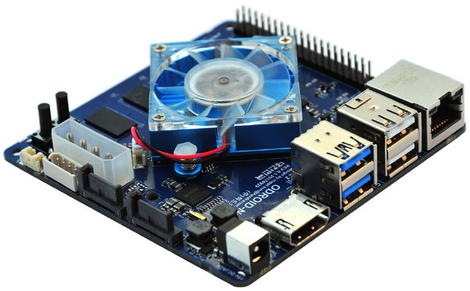
The single-board computer also ships with a large metal heatsink to handle CPU and RAM heat and minimize the need for throttling. The CPU is located on the bottom side of the printed circuit board to improve thermal characteristics.

On the operating system side, the N2 supports Ubuntu 18.04 LTS with Kernel version 4.9.152 LTS supported through to January 2023. It also supports Android 9.0 Pie.

The board measures 90mm x 90mm x 17mm but expands to 100mm x 91mm x 24mm with the heatsink.

Hardkernel says it won't be accepting pre-orders though it does expect to have the boards ready for shipping by early April with sales to start from late March. Cases for the computers are priced $4.

odroidn2board.jpg
The Odroid-N2 won't be as cheap as the $35 Raspberry Pi, but it's also intended for a different market.
.


Friday, February 8, 2019

2/08/2019 07:32:00 PM

Hardware: Raspberry Pi vs new Pine64 board: Same price but H64 has 2x memory

Pine H64 Model B also available with same memory as the Raspberry Pi 3 Model B+ but for $10 less.


Computer and developer-board maker Pine64 has announced the Pine H64 Model B, another Raspberry Pi-like computer that updates Pine64's H64 Model A from last year.

Pine64 H64 Model B boards cost the same as the H64 Model A, starting at $25 for the model with 1GB of RAM, but the newer model now includes a built-in Wi-Fi and Bluetooth module.

Besides these additional wireless modules, the Pine H64 Model B remains largely unchanged, with the same Allwinner H6 system on chip (SoC) and the same layout as the original H64, as well its more expensive Rockchip-based Rock64.

The common design allows each model to use the same shaped cases. The H6 SoC itself is a four-core Cortex-A53 Arm CPU with a Mali-T720 MP2 GPU.

Key features include a microSD slot that supports up to 256GB of storage, 128MB of flash memory, one USB 3.0 port, two USB 2.0 ports, and a two by 20-pin GPIO header.

It also features a mini PCIe connector, digital video out, a 3.5mm combined headphone and mic plug, an eMMC socket, and a Gigabit Ethernet port. And it supports 4K video playback.

Pine64 intends to sell the 1GB board for $24.95, the 2GB model for $35.95, and a 3GB variant for $44.95. More details are available on Pine64's forum.

Pine64 announced two more devices. The Rockchip-powered Pinebook Pro Linux laptop will go on sale for around $199, offering fans a more capable laptop than the existing Pinebook that was intended for tinkering.

The black magnesium-alloy Pinebook Pro runs on a Rockchip RK3399 ARM SoC, has a 14-inch 1080p LCD screen, and comes with either 64GB or 128GB of eMMC storage and 4GB of LPDDR4 RAM.

The Allwinner-based PineTab is a new Linux tablet that runs on the Allwinner A64 SoC and features an 11.6-inch screen with an attachable keyboard. The device is expected to sell for $99 with the keyboard or $79 without it.

It comes with Bluetooth 4.0, wifi 802.11n, 16GB of eMMC storage, 2GB or LPDDR3 RAM, and features a 702p 10-inch LCD screen.

pin64h64modelb.jpg
Pine64 intends to sell the 1GB board for $24.95, the 2GB model for $35.95, and a 3GB variant for $44.95.


READ MORE:

Wednesday, December 5, 2018

12/05/2018 10:58:00 PM

Steam Link app for Raspberry Pi lets you make your own streaming box

Raspberry Pi 3 owners rejoice but note that the app is still in beta


Just a short while ago, Valve discontinued its Steam Link – the little box that lets you stream games from a PC to the TV in your living room – and for those who lament the demise of the device, the good news is you can now make your own with a Raspberry Pi.

That’s because Valve has released the Steam Link app for the Raspberry Pi 3 and Raspberry Pi 3 B+ models running the Raspbian Stretch operating system, albeit only in beta at this point.

You can find instructions on how to install and fire up the app on your Pi in Valve’s announcement post right here.

Work in progress

Initial feedback seems fairly positive, with one gamer observing that the Pi works pretty well as a replacement device, although (anecdotally) there is possibly a little extra lag (in the order of 5ms or so) compared to using the Steam Link. And that would make sense, plus you have to bear in mind that this is still beta software so it will continue to be polished and honed.

It’s great to see Valve make such a move, and give Raspberry Pi owning folks options on this front. Although if you’re unsure about the aforementioned instructions – or you’re running into problems during installation of the app, as seems to have happened to the odd user in Valve’s forum post – then fret not, because we’ve got a full tutorial in the works on making your Raspberry Pi a Steam Link.

This will explain everything in easy to follow steps, so keep your eyes peeled for that one, because it’ll be with you soon enough.

Thursday, November 15, 2018

11/15/2018 05:29:00 PM

Raspberry Pi 3 Model A+ out now: $25 for cut-down Pi 3 B+ with quad-core CPU

Raspberry Pi Foundation updates its budget single-board computer with the Raspberry Pi 3 Model A+

One of the key differences with the Model 3 B feature-wise is that the Pi 3 A lacks an Ethernet port and has only a single USB port.

The Raspberry Pi Foundation has announced the Raspberry Pi 3 Model A+, offering several major improvements over the current compact version of the classic Raspberry Pi 1 Model A+.

The current Model A+ was getting long in the tooth, announced in November 2014 as the successor to the original Model A. The 2014 Model 1 A+ still employed the first Raspberry Pi's single-core chipset.

The new Pi 3 A+, available today, gains the same quad-core system on chip as the Raspberry Pi 3 Model B+ released earlier this year. The SoC is Broadcom's BCM2837B0, which is a 1.4GHz 64-bit quad-core Arm Cortex-A53 CPU.

Despite the upgraded specs, the Pi 3 A+ will still cost $25, or $10 less than Raspberry Pi 3 Model B+, which has double the memory.

One of the key differences with the Model B+ feature-wise is that the Pi 3 A+ lacks an Ethernet port and has only a single USB port.

Their absence permits the smaller form factor, which is more squarish compared with the Pi 3B+. Like the Pi Zero, the new Pi 3 A+ has 512MB of RAM, which is double the RAM of the 2014 model when it launched. The old A+ doubled its RAM in 2016.

To ensure continuity, the Pi 3 A+ shares the same mechanical footprint as the 2014 Model A+, measuring 65mm × 56.5mm (2.56in × 2.22in), with the same 40-pin GPIO header. Its size makes it more appealing for projects that need a smaller computer.


However, the Pi 3 A+ does feature dual-band 2.4GHz and 5GHz 802.11ac wireless LAN, and Bluetooth 4.2.

The HDMI 1.3 port supports 1,080p monitors and TVs, and there's a microUSB connector for power, as well as a four-pole stereo audio output and composite video jack.

The Raspberry Pi Foundation said the Raspberry Pi 3 A+ will remain in production until at least January 2023.

Raspberry Pi 3 A+ is available from approved resellers, such as RS Components and Farnell element14.


In the spec sheet, the Raspberry Pi Foundation says the Raspberry Pi 3 A will remain in production until at least January 2023.


SOURCE:

Tuesday, October 16, 2018

10/16/2018 07:18:00 PM

Raspberry Pi A+-sized $10 La Frite Linux board has better specs at half the price

Libre Computer's $10 La Frite board offers a cheap alternative to the Raspberry Pi A+.


The cheapest La Frite option costs $10 for a board with 512MB of RAM, while for $15 and up, backers can get a La Frite with 1GB of RAM.

The La Frite board is a follow up to Libre Computing's $25 Le Potato board and is "loosely based" on the design of the Raspberry Pi A+ -- a smaller and cheaper Pi than the $35 Raspberry Pi B+ -- due to the 40-pin GPIO header setup.

It's currently available to backers on the device's Kickstarter page and will be generally available in November.

The cheapest $10 option is a La Frite with 512MB of RAM, while for $15 and up, backers can get a La Frite with 1GB of RAM.

The La Frite is running on an S805X system on a chip that features a quad-core Arm Cortex-A53 at 1.2GHz and Arm Mali-450 GPU Cores, according to Libre Computer's specs sheet.

As noted by ZDNet's sister site TechRepublic, the La Frite can output video to 1,080p displays via HDMI 1.4, making it comparable to the Raspberry Pi 3 B+, while the La Frite offers faster DDR4 memory.

The computer has two USB 2.0 Type ports, 100Mbps Ethernet, HDMI 2.0, a micro USB power socket, and an eMMC interface.

Key features the Le Frite is missing compared with the Raspberry Pi 3 B+ are Wi-Fi and Bluetooth support. But that could be expected as these were also missing from its predecessor, the $25 Le Potato.

Libre Computer says the board supports Ubuntu, Debian, LibreELEC, Lakka, RetroPie, Android Oreo, and other Linux distributions.

Other boards the Shenzhen-based company has launched include the $35 Renegade, which runs on a Rockchip RK3328 quad-core Cortex A53 processor, and the pricier and more powerful Renegade Elite with a six-core Rockchip RK3399 CPU.

The Le Frite campaign has already raised twice its $10,000 target, which means it will be funded with shipments commencing in November.

Saturday, September 1, 2018

9/01/2018 07:27:00 PM

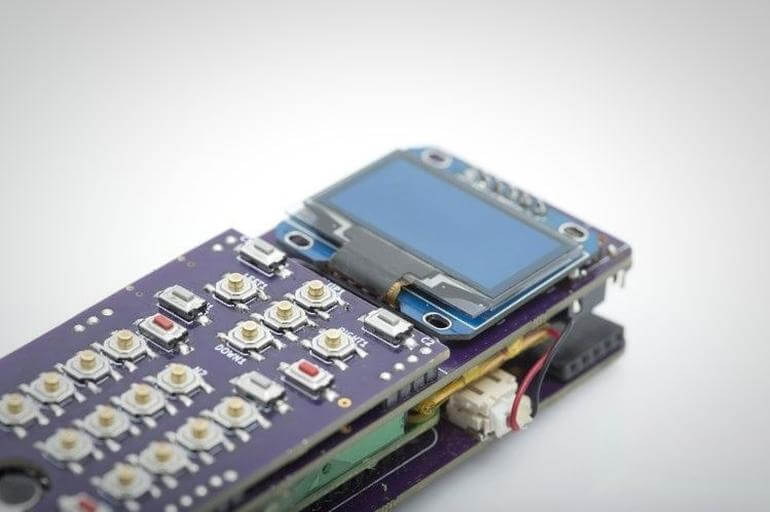
Raspberry Pi-based ZeroPhone promises 'an open-source, Linux-powered' handset

A project to build the $50 phone has been launched on Crowd Supply.

The ZeroPhone will be based around the tiny Raspberry Pi Zero, an Arduino microcontroller, and the ESP8266 Wi-Fi module.

If you're looking for a smartphone that doesn't harvest data 24/7, then the ZeroPhone may be the device for you.

A project to build the $50 phone has been launched on Crowd Supply, promising to deliver "an open-source, Linux-powered" handset with "no carrier locks, bloated apps, or data mining" and that "doesn't depend on big companies".

Android smartphones have hit the headlines recently, first for Google tracking users who had switched location tracking off, and second for sending data to Google's servers 50 times more often than an iPhone.

The ZeroPhone will be based around the tiny Raspberry Pi Zero, an Arduino microcontroller, and the ESP8266 Wi-Fi module.

The ZeroPhone comes with several extras not found on your typical handset, including a mini-HDMI port and a single full-size USB 2.0 port, alongside the more typical support for Wi-Fi and a 3.5mm headphone jack.

One downside is the phone will initially launch only with 2G GSM connectivity, with 3G expected to be added later. The screen is also far smaller than is typically the case, with a 1.3-inch, 128 x 64 OLED display.

"ZeroPhone is user-friendly and will have the typical features of a phone, but will give you advanced features when you need them," according to the ZeroPhone's creator Arsenijs.

"You can modify and repair it easily, and it's power-user and programmer-friendly. It's also built from widely available components so you can build a ZeroPhone independently if you need to."

To get the most of the phone, users will need to be technically proficient. While the splash page for the project says the likes of IR receivers and the Pi's 5 and eight-megapixel cameras can be wired up the phone's electronic interfaces, this will require users to hook up the electronics themselves.

However, if you're confident using the Linux terminal, you'll be able to SSH into the device for remote access and run a wide range of Linux software on the phone.

It can even be hooked up to a keyboard and mouse and used as a desktop, although the Pi Zero's aging single-core processor isn't capable of running a heavy graphical desktop comfortably.

The ZeroPhone project is listed as "coming soon" and those interested can sign up for updates on Crowd Supply.


Sunday, August 19, 2018

8/19/2018 10:45:00 PM

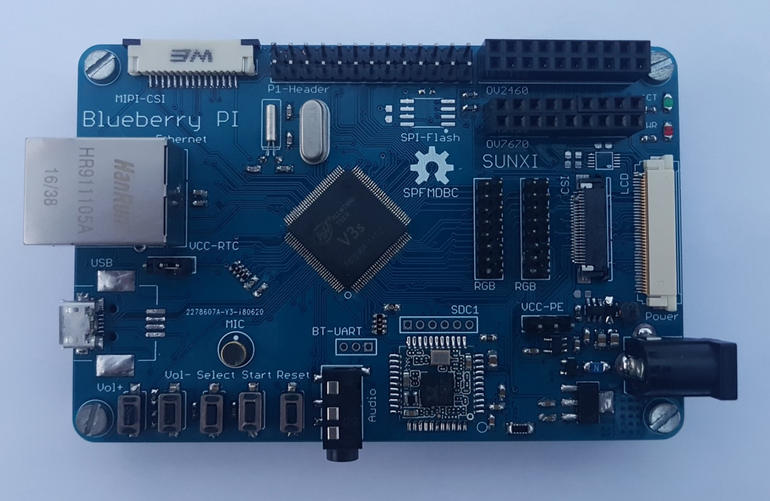
A Raspberry Pi-style computer you can build yourself: Blueberry Pi

Provided you can think of something useful to do with a board with only 64MB of on-chip RAM.

Raspberry Pi

If buying a Raspberry Pi or one of the many other single-board computers available isn't a tough enough challenge, hacker Marcel Thürmer has sketched out enough details about his Blueberry Pi open-source hardware project to help the like-minded take things to the next level.

As Thürmer wryly notes on the GitHub page where he's left the Blueberry Pi's schematics, this is just "another fruit single-board computer" based on the Allwinner V3s system on chip (SoC).

However, while some single-board computer makers have open-sourced their hardware designs unless you're building a large enough quantity, it's probably not worth the cost or effort.

The key difference with the Blueberry Pi, according to hacker site Hackaday is that Thürmer has made it cheap and simple enough to build without needing your own pick-and-place robot.

That particular SoC, intended for cameras, is useful because it comes with an easy-to-solder TQFP or 'thin quad flat-pack' package, which allowed him to choose a two-layer printed circuit board (PCB) and is cheaper than, say, an eight-layer PCB.

The downside with the Allwinner V3s is that it comes with 64MB of RAM, which is far less than the Raspberry Pi Zero's 512MB.

Other features of the DIY Blueberry Pi include 100mbps Ethernet, one USB host port, a camera serial interface that lacks Linux kernel support, Wi-Fi, Bluetooth, an RGB interface for connecting displays, an audio jack, and an onboard microphone.

It also has four buttons for play, pause, next and previous, and a Raspberry Pi compatible header, as well as an SD card slot and serial peripheral interface (SPI) for Flash.

According to Thürmer, the Blueberry PI can boot from an SD card or SPI Flash. He notes that the V3s doesn't have a standard video output, but he plans to create a video add-on board for VGA or HDMI.


Thursday, June 28, 2018

6/28/2018 04:36:00 PM

Raspberry Pi-style Renegade Elite runs Android Oreo on six-core, 4K board

If you're specifically not looking for a Raspberry Pi, the Renegade Elite could be the board of choice.


The Renegade Elite will run on the Rockchip RK3399.

Libre Computing, the maker of a Rockchip-powered Raspberry Pi-shaped board called Renegade, will soon launch a beefed-up model dubbed Renegade Elite.

Whereas the $35 Renegade competed with the Raspberry Pi on price and maintained its form factor, the Renegade Elite is a board of a different sort.

It will launch on an Indiegogo crowdfunding campaign for $100 in July and then will be available in August generally for about $120, according to Liliputing. With accessories, the board could cost around $200.

Compared with the Renegade, the Renegade Elite features a faster Rockchip processor, more ports, additional Type-C ports, and, instead of a single 40-pin header, it has a 60-pin PCI-E expansion header and a 60-pin low-speed header.

The six-core Rockchip RK3399 CPU in the Renegade Elite consists of two ARM Cortex-A72 cores and four ARM Cortex-A53 cores, as well as a four-core ARM Mali-T860 GPU. The original Renegade featured a slower Rockchip RK3328 chip.

The Renegade Elite is the latest in a string of higher-powered 2018 boards to use the Rockchip RK3399, including the RockPro64 and the $100 Odroid-N1.

However, the Odroid-N1 has just been canceled due to problems with RAM supplies from Samsung and SK Hynix. An N2 board is now in the planning and may have a new, faster processor that hasn't been announced yet.

Other core features of the Renegade Elite include 4GB DDR4 RAM, two USB Type-C ports both of which support DisplayPort for two-display setups, while one supports power delivery.

There's also an HDMI 2.0 port, Gigabit Ethernet with optional power-over-Ethernet support, three USB Type A ports, a microSD card slot, an infrared receiver, and real-time clock with battery backup.

Libre Computer says the board can run Android Oreo or Linux 4.19 and above, or a Rockchip variant with the Linux kernel 4.4.


Wednesday, March 21, 2018

3/21/2018 10:41:00 PM

Raspberry Pi with a side of AI: These intense new sheets accompany NPUs

Engineer board producers like 96Boards are homing in on CPUs helped by neural handling units. 


The Huawei-based HiKey 970 is promoted for savvy city applications, self-sufficient vehicles, and mechanical autonomy.

The Raspberry Pi Foundation just discharged the Raspberry Pi 3 Model B+ with a zippier CPU and quicker system associations, however, what the colossally well known $35 board hasn't yet picked up is a neural handling unit (NPU). 

NPUs are helping makers of lesser-known barricades speed PC vision applications, for example, picture and protest acknowledgment, and offer undertaking and makers an all the more effective stage for building everything from savvy building applications to self-sufficient vehicles. 

96Boards, the creator of Linaro-outlined open-source Arm sheets, has uncovered three new PCs with committed NPUs, including the HiKey970, the Ultra96, and the Rock960, which is likewise accessible in an undertaking version. 

The new sheets have devoted NPUs from Huawei and Rockchip. The HiKey970 ships with Huawei's Hisilicon Kirin 970 SoC, which includes an NPU over an eight-center CPU and a 12-center GPU. 

The Rock960 in the interim accompanies Rockchip's souped-up RK 3399Pro, a processor that objective's Google's TensorFlow Lite system for building AI benefits on iOS and Android gadgets. 

Rockchip declared its 'AI processor' RK3399Pro in January, which utilizes Arm's big.LITTLE CPU design with a double center A72 and quad-center A53 Cortex processors. Its antecedent, the standard RK3399, was found in some Chromebooks. 

The Rockchip 3399Pro has earned stripes with designers for its noteworthy execution when dealing with certain profound learning models for picture arrangement. 

As CNX-Software detailed not long ago, the Rockchip 3399Pro is guaranteed to beat the NPU in Apple's A11 Bionic chip on the iPhone X. 

While they share some physical likeness to the Raspberry Pi, the NPU-upgraded designer sheets are gone for an alternate market. 

The Huawei-based HiKey 970 has been tweaked so designers can center around building more astute applications instead of execution upgrades and it's showcased for savvy city applications, self-ruling vehicles, and mechanical technology. 

96Boards hasn't discharged evaluating or accessibility points of interest yet. Notwithstanding, the HiKey960 board in view of a Huawei Kirin 960 octa-center Arm processor begins at $240. It included comparative specs with 32GB of onboard stockpiling and an Arm Mali GPU with 3GB RAM. 


Tuesday, March 20, 2018

3/20/2018 08:31:00 PM

Hands-on with the Raspberry Pi 3 Model B+

A new, improved Raspberry Pi 3 is available. I've been trying it out, here's what I have found so far.


The new Raspberry Pi 3 Model B+ was announced and started shipping last week.

Of course, I went straight to the good folks at the Swiss Pi-Shop.ch and ordered one, which I received the next day.

So, the first thing on my to-do list is to congratulate and thank both the Pi Foundation and the Pi-Shop.ch for their efficiency in making this new model available immediately after the announcement.

The official announcement on the Raspberry Pi Blog gives all the details. There is a cute little video which highlights the improvements, and then a longer blog post which fills in the details. In a nutshell, it comes down to this:

  • The CPU speed has been bumped up to 1.4GHz
  • The Wi-Fi has been bumped up to 802.11ac
  • The Bluetooth has been bumped up to 4.2
  • The Wired Ethernet connection has been bumped up to 1Gbps (but see below for a caveat on this)
  • The power-over-ethernet capability has been added (but see below for a caveat on this)
  • Network and USB boot has been improved
  • Thermal management has been improved (so the higher CPU speed doesn't turn your Pi3B+ into a pile of goo)


None of that is earth-shattering, which probably goes a long way toward explaining why this is not called the Raspberry Pi 4, but it all adds up to a very nicely improved Raspberry Pi 3.

OK, let's start with the caveats. First, the Gigabit Ethernet still connects to the CPU via the USB 2.0 bus, which means that it actually has a maximum speed of about 300Mpbs. That is still about a three-fold improvement over the 100Mbps wired ethernet in all previous Raspberry Pi models (including the Pi 3 Model B). Actually, a bit more than three-fold, since the original didn't quite get the full 100Mbps, and the 3B+ gets slightly more than 300Mbps.


Power-over-Ethernet four-pin header

Second, although PoE (Power-over-Ethernet) capability has been added, the actual hardware to accomplish this is not included in the base configuration. There will be a PoE HAT (add-on board) available soon, which will connect to a new four-pin header that was added for this purpose.

I will add a caveat to the caveat about this: the four-pin header is new. As you can see in the picture, it sticks up from the motherboard. There was nothing sticking up in this location on any previous Raspberry Pi model. Some Pi cases are shaped and molded in such a way that they won't fit the 3B+ because of this new header.

I have tried the official Raspberry Pi case, and it fits just fine in that. But if you are ordering any other case, make sure that you check that it is compatible with the 3B+. Here are a couple of other examples, which I have written about previously, and which I have tried:

Farnell Element 14 Pi Desktop -- fits just fine, works just fine
Seven-inch Touch Display and Case -- fits just fine, works just fine
The wireless networking improvements have come about thanks to a new 'combo' Wi-Fi and Bluetooth chip, which has a rather spiffy embossed metal shield. The shield is not just for looks, though, because it has made it possible for them to get FCC radio certification for the board, which could make life a lot easier for those who want to make other products using the 3B+.


Wi-Fi and Bluetooth chip

If you only have 2.4GHz Wi-Fi, you will see only a small improvement in wireless networking performance. But of you have 5GHz Wi-Fi available, you could see as much as a three-fold improvement in wireless performance. Zowie, that's good stuff!

Oh, and one other piece of wireless good news, I found that my Bluetooth mouse connects to the 3B+ without the silly "connected, but no services available" message. Not a big deal, I know, but at least it's one fewer small irritant.

OK, so much for hardware, now what about software? Well, as has pretty much always been the case, the Pi Foundation has put a lot of effort into making sure that the new hardware is as compatible as possible with previous models.

There is a new release of Raspbian to support the 3B+, which you can get from the Pi Downloads page, or you can install the latest updates on an existing Raspbian image. Note that if you are running Raspbian already, and you haven't updated it for a while, that SD card will probably not boot in the Pi 3B+, so be sure to do an update in whatever Pi 3 (or earlier) you are running before taking the card out and trying it in the 3B+.

Unfortunately, the same is not true of Kali Linux for the Raspberry Pi 2 and 3. Even after installing all of the latest updates, it still won't boot in the Pi 3B+. I just checked the Kali ARM Images Download page, and I don't see anything mentioned there about the new model, so I guess they still have a bit of work to do.

Once you have the new (or updated) software installed, the 3B+ boots, runs, looks and feels just like the rest of the Raspberry Pi family. The difference is speed is noticeable in almost everything you do, starting from booting a bit faster and all the way through the PIXEL desktop and web applications. It doesn't blow your socks off, but it is a clear improvement, based simply on overall user impression. If you want benchmarks and numbers on the various improvements, refer to the Pi Foundation Blog post linked above.

The bottom line on this new Raspberry Pi is that it is definitely a worthwhile improvement on the Raspberry Pi 3 Model B. I am going to leave mine installed in the Element 14 Pi-Desktop box for now, as I think it makes that an even nicer unit.


Saturday, March 17, 2018

3/17/2018 05:57:00 PM

Raspberry Pi 3 Model B+ arrives: Faster CPU, Wi-Fi, 300Mbps Ethernet

Raspberry Pi Foundation unveils the Raspberry Pi 3 Model B+, its newest model in the Raspberry Pi 3 lineup.


The Raspberry Pi Foundation has launched the Raspberry Pi 3 Model B+, offering a faster CPU and faster wireless throughput than its predecessor, the Raspberry Pi 3 Model B.

Raspberry Pi 3 Model B+ comes exactly two years after the launch of the Raspberry Pi 3 Model B and is in line with Raspberry Pi Foundation's two-year B+ 'evolution' upgrade.

In other words, the changes don't warrant calling it a Raspberry Pi 4, but there are noticeable improvements, including a faster processor, higher Wi-Fi speeds, and faster Ethernet.

Download now: Raspberry Pi 3 Model B+: An insider's guide (free PDF)

The Pi 3 Model B+ has a 1.4GHz 64-bit quad-core Broadcom Arm Cortex A53-architecture processor compared with the Raspberry Pi 3 Model B's 1.2GHz CPU. It doesn't seem like much of a change but it does amount to a 15 percent performance improvement.

It also supports dual-band wireless local-area networks at 2.4GHz and 5GHz, Bluetooth 4.2, and Bluetooth Low Energy.

Raspberry Pi Foundation says the dual-band wireless LAN comes with modular compliance certification, which should make it easier and cheaper to commercially launch products based on the Raspberry Pi 3 Model B+. This move should help cut down on wireless LAN compliance testing.

Otherwise, physically it's identical to the Raspberry Pi 3 Model B and Raspberry Pi 2, featuring four USB 2.0 ports, a 40-pin GPIO header, one full-size HDMI port, display and camera ports, and four-pole stereo output and composite video ports.

The Raspberry Pi 3 Model B+'s Gigabit Ethernet over USB 2.0 offers a maximum throughput of 300Mbps.

TechRepublic's Nick Heath got an early hands-on with the Raspberry Pi 3 Model B+ and found in benchmarking tests that it's the fastest Raspberry Pi model available, both in single-core and quad-core measurements.

As Heath notes, the addition of 802.11ac Wi-Fi gives the Raspberry Pi 3 Model B+ about triple the throughput of the Pi 3 Model B's 2.4GHz 802.11n Wi-Fi.

Eben Upton, co-creator of the popular developer board, told TechRepublic that its B+ releases are all about refinement.

"It's not a Raspberry Pi 4. I think what we've ended up with is something which is a really good B+, a bit too good for a B+, but that would be not really anywhere near enough for a Raspberry Pi 4," said Upton.

"The B+ is our attention-to-detail spin for the product, where we take all the stuff we've learned in the past couple of years and smoosh it all together and make a new thing that addresses some of the concerns or takes advantage of some of the opportunities that have come along in the intervening time."
.

Thursday, March 15, 2018

3/15/2018 02:15:00 AM

Raspberry Pi 3 Model B+ arrives: Faster CPU, Wi-Fi, 300Mbps Ethernet


Raspberry Pi Foundation unveils the Raspberry Pi 3 Model B+, its newest model in the Raspberry Pi 3 lineup.


The Pi 3 Model B is physically identical to the Raspberry Pi 3 Model B and Raspberry Pi 2.
The Raspberry Pi Foundation has launched the Raspberry Pi 3 Model B+, offering a faster CPU and faster wireless throughput than its predecessor, the Raspberry Pi 3 Model B.

Raspberry Pi 3 Model B+ comes exactly two years after the launch of the Raspberry Pi 3 Model B and is in line with Raspberry Pi Foundation's two-year B+ 'evolution' upgrade.

In other words, the changes don't warrant calling it a Raspberry Pi 4, but there are noticeable improvements, including a faster processor, higher Wi-Fi speeds, and faster Ethernet.

The Pi 3 Model B+ has a 1.4GHz 64-bit quad-core Broadcom Arm Cortex A53-architecture processor compared with the Raspberry Pi 3 Model B's 1.2GHz CPU. It doesn't seem like much of a change but it does amount to a 15 percent performance improvement.

It also supports dual-band wireless local-area networks at 2.4GHz and 5GHz, Bluetooth 4.2, and Bluetooth Low Energy.

Raspberry Pi Foundation says the dual-band wireless LAN comes with modular compliance certification, which should make it easier and cheaper to commercially launch products based on the Raspberry Pi 3 Model B+. This move should help cut down on wireless LAN compliance testing.

Otherwise, physically it's identical to the Raspberry Pi 3 Model B and Raspberry Pi 2, featuring four USB 2.0 ports, a 40-pin GPIO header, one full-size HDMI port, display and camera ports, and four-pole stereo output and composite video ports.

The Raspberry Pi 3 Model B+'s Gigabit Ethernet over USB 2.0 offers a maximum throughput of 300Mbps.

TechRepublic's Nick Heath got an early hands-on with the Raspberry Pi 3 Model B+ and found in benchmarking tests that it's the fastest Raspberry Pi model available, both in single-core and quad-core measurements.

As Heath notes, the addition of 802.11ac Wi-Fi gives the Raspberry Pi 3 Model B+ triple the maximum throughput of the Pi 3 Model B's 2.4GHz 802.11n Wi-Fi.

Eben Upton, co-creator of the popular developer board, told TechRepublic that its B+ releases are all about refinement.

"It's not a Raspberry Pi 4. I think what we've ended up with is something which is a really good B+, a bit too good for a B+, but that would be not really anywhere near enough for a Raspberry Pi 4," said Upton.

"The B+ is our attention-to-detail spin for the product, where we take all the stuff we've learned in the past couple of years and smoosh it all together and make a new thing that addresses some of the concerns or takes advantage of some of the opportunities that have come along in the intervening time."


Friday, March 2, 2018

3/02/2018 04:28:00 PM

What are the best Raspberry Pi alternatives? Everything you need to know about Pi rivals

A guide to Raspberry Pi alternatives, from low-cost options to more powerful boards.


Six years after the release of the $35 Raspberry Pi computer, demand remains as strong as ever, with sales on track to pass 18 million boards anytime now.

While the Pi's initial success stemmed from it being a budget board packed with enough computing power and features to perform tasks ranging from controlling robots to running a media center, its enduring popularity results from its strong software support and extensive community, who help newcomers and have created a wealth of tutorials and guides.

But the Pi is not alone, a broad spectrum of single-board computers exist: some similar to the Pi, some budget bare-bones offerings and others more expensive but packed with improvements.

The quality of these boards varies greatly, as does the type of tasks they are suited to, and this guide will walk you through some decent options for Pi alternatives, while also highlighting the drawbacks.

WHAT ARE THE STRENGTHS OF THE RASPBERRY PI?

The Pi's primary strength is its ease of use compared to many rivals.

Years of work by the Raspberry Pi Foundation improving the Pi's core software have created a default operating system called Raspbian, which not only gets the best out of the Pi hardware but is loaded with free software -- both the everyday basics like browsers and an office suite and also tools for learning to code.

Yet the official support is only half the story, with much of the board's usability coming from the plethora of community-created guides and tutorials -- with the answer to many questions only a Google away. Beyond the staunch community support, the Pi can be augmented by a broad ecosystem of boards and kits that extend its capabilities, turning the board into everything from a robot to a virtual assistant.

The Pi also strikes a shrewd balance between price and capability. Co-creator of the board Eben Upton has stated in the past that keeping the board affordable is very important, and its latest incarnation, the Raspberry Pi 3 Model B manages to pack an awful lot into a $35 computer.

WHAT ARE THE SHORTCOMINGS OF RASPBERRY PI?

There hasn't been a release of a new Raspberry Pi board since February 2016 and in the intervening years, some of the technologies that were too expensive for the Pi 3 have become affordable.

New boards have started to emerge that cram in features not found in the Pi 3 -- memory, faster processors, Gigabit Ethernet or support for 4K displays -- onto boards costing $35 or very close to it.

That said, the specs list often doesn't tell the whole story. Upon testing, certain boards that outperform the Pi on paper have been found wanting, due to bottlenecks in the system.

Poor software and driver compatibility is also a common complaint about Pi rivals, although some are far better than others in this regard.

WHAT'S THE BEST CHEAP PI ALTERNATIVE?

Unfortunately, if you want a cheaper board than the Pi you're going to have to compromise. Those boards that have better hardware generally have far worse software support and those that have better software support are generally missing some key hardware features.

If you don't mind tackling issues with software and drivers, then you could try the $29 Pine A64. On the face of it the board has a lot of advantages over the Pi -- combining Gigabit Ethernet and 2GB DDR3 RAM with 802.11n Wi-Fi support, a quad-core, Arm Cortex A53-based processor and a pin header that is compatible with hardware add-ons for the Pi boards.

There's a big but, however, on release the Pine64 was heavily criticized in several reviews for having such poor software support that some reviewers couldn't even get a working Linux desktop to boot.

Two years on and things seem to have improved, however, with the board's Wiki listing working versions of Android 7.1 and Ubuntu Xenial with the Mate desktop -- complete with office suite and browser -- as being available for the board. However, there still seem to be issued, such as the Xenial build missing support for hardware acceleration for video.

WHAT IS A GOOD RASPBERRY PI ALTERNATIVE FOR THE SAME PRICE?

For the same price as the Pi 3, $35, the Odroid-C1+ offers broadly the same specs but adds Gigabit Ethernet.

The C1+ packs a 1.5GHz quad-core Arm-based processor -- faster than the Pi 3 but based on a slightly older architecture -- 1GB of DDR3 RAM, and the reasonable-for-the-price Mali-450 GPU.

However, the Odroid does trail the Pi 3 in one notable respect, missing that board's Wi-Fi connectivity.

A big plus for the computer is that the Odroid set of boards have a good reputation for the quality of their operating systems and driver support. While it's software support is good -- including Ubuntu 16.04 LTS, the LibreElec media center, and Android -- some of operating systems are older versions, for example, Android 5.1.

OTHER GOOD CHEAP PI ALTERNATIVES?

If you're just after similar specs for a lower price then the Orange Pi range offers a lot, at least on paper.

The $25 Orange Pi Lite2 has similar specs to the more expensive Raspberry Pi 3 Model B, with the same memory, a 64-bit quad-core processor, reasonable GPU, 1GB memory and Bluetooth 4.1 support. It even has several advantages over the Pi 3, at least on paper, such as a single USB 3.0 port, support for 802.11ac Wi-Fi and support for Android 7.0.

However, it trails the Pi in a couple of respects, with fewer USB ports, and fewer pins for adding hardware to the board and missing Ethernet.

The Orange Pi Lite2

The bigger caveat is that, in general, Orange Pi board reviews are critical of poor driver support, missing software and being stuck with unstable versions of older operating systems, so only buy these boards if you're prepared to spend a lot of time trying to get a software to work.

WHAT ARE CHEAP ALTERNATIVES TO THE RASPBERRY PI ZERO W?

The $10 Raspberry Pi Zero W is one of the smallest and cheapest machines available, costing roughly the same as a KFC Bargain Bucket, and packing 802.11b/g/n Wi-Fi and Bluetooth 4.0.

As such it's hard to find a machine to match it. That said, the Orange Pi boards do pack in a lot of features for the money, but, as mentioned, come with a less than stellar reputation when it comes to usability and software.

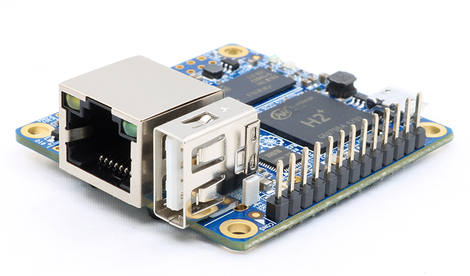
Still, if you're suitably confident you can deal with the technical hiccups, the Orange Pi Zero H2 sells for less than the $10 Raspberry Pi Zero W while still offering the 802.11n Wi-Fi and 10/100 Ethernet of the Pi board.

The Orange Pi Zero H2.

Available as a $7 or $9 board, the cheaper variant has 256MB RAM -- half the memory of the Zero W. And while the board might be slightly cheaper than the Pi Zero W, it lacks the Pi's HDMI port, with the only audio-visual interface being available via the board's pins, meaning you'll have to be reasonably proficient at tinkering with hardware skills to hook it up to a monitor. This might be less of an issue for a device of this type, however, as many users would remotely connect to the board via another computer.

The $10 Nano Pi Neo will cost you the same as a Raspberry Pi Zero W but lacks the Pi's built-in Wi-Fi and Bluetooth support has half the memory (the 512MB version costs $12) and no mini-HDMI. However, the Allwinner H3 processor is based on a newer architecture than the Pi Zero W and clocked to run faster and has 36 pre-soldered GPIO headers for hooking up to hardware. A 10/100M Ethernet port will let you remotely connect to the board. So a reasonable choice for tinkering with hardware or prototyping simple IoT devices.

WHAT IS THE CHEAPEST RASPBERRY PI ZERO ALTERNATIVE?

One of the cheapest alternatives is probably the Orange Pi Zero H2 mentioned above, however, it is difficult to find a board that combines the balance of hardware features and software support offered by the Pi Zero W, as is true of the more expensive Raspberry Pi 3 Model B.

WHICH RASPBERRY PI ALTERNATIVES HAVE THE BEST REPUTATION?

Odroid boards may cost a little bit more than the competition but generally have a good reputation for being decent boards with the good operating system -- Ubuntu and Android -- with a range of decent bundled software -- browsers, office suite and the like. One of the few downsides seems to be boards like the Odroid XU4 require additional add-ons to make its GPIO pins compatible with Raspberry Pi expansion boards and add-ons.

WHAT IS THE BEST RASPBERRY PI ALTERNATIVE DUE OUT IN 2018?

There are some seriously powerful single-board computers coming out in 2018, many of which are based on the hexacore Rockchip RK3399 processor, which pairs beefy 2GHz dual-core Arm Cortex A72 cores with less powerful quad-core 1.5GHz Arm Cortex A53 cores.

A good choice, based on the range's previous track record, will likely be the Odroid-N1. As mentioned, the board runs on a hexacore processor backed up by 4GB of memory, two USB 3.0 ports, Gigabit Ethernet, will run Android 7.1 and Ubuntu 18.04, can be hooked to 4K displays via HDMI 2.0, has two SATA 3.0 ports for fast storage access, and 40 GPIO pins for connecting homemade hardware. The board, due out around the middle of this year, basically offers most of the specs of the $449 Samsung Chromebook Plus in a $110 board.


The Odroid-N1

However, the $110 price tag may push it out of the realm of Raspberry Pi competitors in many people's eyes, so a better choice may be holding on for Odroid makers Hardkernel to release the N1 Lite, which they anticipate will be a $75 board, with the same specs apart from having 2GB RAM and no SATA ports.

If you can't wait, then the forthcoming RockPro64 board has very similar specs to the Odroid-N1, minus the SATA ports, and is due out in March for the lower price of $79. However, in contrast to the generally good reputation of Odroid, reviews of a 2016 board from the makers of the RockPro64 criticized the "sparse" software and documentation.

WHAT ARE THE MOST USEFUL APPLICATIONS FOR RASPBERRY PI?

The Raspberry Pi is nothing if not versatile, with uses ranging from the media center, to the lightweight general-purpose computer to the cheap machine for prototyping gadgets.

Of the myriad alternative single-board computers available, there are machines that double down on each of these specialties -- here are your options:

WHAT IS THE BEST RASPBERRY PI ALTERNATIVE FOR A MEDIA CENTER?

The $25 Rock64 Media Board is great value for a board that can manage 4K playback of local video -- that is stored on your hard drive rather than streaming over the internet -- at 30fps in various video formats, and handles 1080 playback of YouTube video via the built-in media player in the Android 7.1.2 OS that runs on the board. One rather big downside is that reviews found a lack of working apps on the OS, with major streaming sites like Netflix not working. So maybe only a good choice if you're only interested in streaming video stored locally or you're willing to spend a lot of time tinkering to get the software working.


The Odroid-C2.

If you're willing to pay a bit more, then the $46 Odroid C2 is likely a better choice. The C2 is 2 - 10x faster than the Raspberry Pi 3 according to tests, has double the memory of the Raspberry Pi 3, Gigabit Ethernet, supports 4K displays via HDMI 2.0, together with up to 32 channel audio. While it lacks Wi-Fi support, users report the board performs well as a media center, smoothly playing back local 1080p and 4K HEVC files and with support for streaming services such as Netflix -- and running the Ubuntu, Android and the media center software LibreElec.

WHAT IS THE BEST RASPBERRY PI ALTERNATIVE FOR A ROUTER?

A reasonable option, thanks to its prioritizing fast data transfer over other uses, is the $35 NanoPi Neo Plus2. While it lacks HDMI or other audio-visual out ports, it sports Gigabit Ethernet, 802.11n Wi-Fi and Bluetooth 4.0 support, quad-core Cortex A53 Allwinner H5 processor, 1GB DDR3 RAM and 8GB of eMMC onboard storage.

WHAT IS THE BEST RASPBERRY PI ALTERNATIVE FOR A HOME SERVER OR NAS?

Fast storage is important when you're pulling a lot of data from the board, for instance in the instance of running the board as a file server.

While most of the boards with SATA support cost three figures, putting them outside of the designation of a Pi alternative, there are a growing number of low-cost computers with USB 3.0 support, which you can hook an SSD to get better data access speeds than is possible on the Pi.

A decent choice of the board with two USB 3.0 ports, 2GB memory, gigabit Ethernet and an octa-core processor is the $59 Odroid XU4.

If you're willing to really push the boat out then the $135 UDOO Quad has built-in support for SATA, although at several times the cost of the Pi it's not really a rival board. As mentioned the $110 Odroid-N1 will also pack two SATA 3.0 ports when it arrives later this year.

There are also low-cost options with SATA support, such as the $35 Banana Pi M1+, which has an older SATA 2.0 port, although a USB 3.0 board like the XU4 would probably be a better option.

WHAT IS THE BEST RASPBERRY PI ALTERNATIVE FOR A DESKTOP PC REPLACEMENT?

The Pi isn't really the best choice for a full desktop computer replacement. While the Pi's default Raspbian desktop runs smoothly and includes the necessary office suite and browser, today's script and video-heavy websites run noticeably slower on the Pi than on a modern PC, and are just slow enough that the performance will start to grate after a while.

That's obviously fine, as the Pi is so cheap and wasn't really created with this use in mind, but if you want to use an alternative board as a desktop computer it's worth shelling out a little bit more for something like the $54 Odroid XU4 -- which runs Ubuntu 16.04 with the Mate desktop and bundled with various software, using GPU acceleration to boost performance.

However, if browsing the web and content consumption is your primary goal then you might be better going with the Asus Chrome bit compute stick or the Intel NuC mini-PC recommended below.

WHAT IS THE BEST RASPBERRY PI ALTERNATIVE FOR A RETRO-GAMES EMULATOR?

The Odroid boards seem to be a decent choice for retro-gaming, with both the $46 Odroid C2 and the $59 Odroid XU4 supporting the RetroPie gaming platform, which bundles a wide range of Arcade, home-console and classic PC game emulators.

Both seem to perform better than the Raspberry Pi 3, with the Odroid XU4 able to smoothly emulate newer console games, such as Goldeneye on the N64, Streetfighter on the Dreamcast and Kingdom Hearts on the PSP.


The Odroid-XU4

One downside is that Bluetooth and Wi-Fi support are not built into the XU4 or C2, so you'll need to use a USB dongle for wireless connectivity.

WHAT IS THE BEST RASPBERRY PI ALTERNATIVE FOR HOMEMADE IOT GADGETS?

If you're after a super simple machine then the $10 Nano Pi Neo mentioned above is a reasonable choice, providing you're happy working with wired rather than wireless connectivity. If you want Wi-Fi there is the $8 Nano Pi Duo ($12 with 512MB memory), whose Allwinner H2+ CPU is clocked at a faster speed than the Pi Zero W and has a newer processor architecture and whose two pre-soldered pin headers offer 32-pins for hooking up to hardware. However, it lacks the Pi's mini-HDMI port and Bluetooth support.

If you don't mind spending a little bit more, there's the $35 NanoPi Neo Plus2, which also offers 32 pins spread across two headers.

If you want something with a bit more oomph and are willing to spend more than double the cost of the Pi 3, then there is the $99 Up Core.

The computer has a quad-core 1.8GHz Intel Atom x5-Z8350 processor, 1GB memory, one USB 3.0 port and 16GB eMMC storage. However, the ace up the board's sleeve is the 100 pins available for hooking up additional boards and other custom hardware, compared with the 40-pin header available on the Pi. The UP Core's high-speed expansion connector includes pins for UART, SPI, 2 x USB HSIC, PCI-Express, GPIO, Intel Sensors Hub, SDIO and 5V Power.

WHAT IS THE BEST RASPBERRY PI ALTERNATIVE FOR HARDWARE MAKERS?

The $99 Up Core board listed above offers a lot of options for connecting up hardware, but if you're an amateur maker you should check out the Beagle Boards and Arduino.

A good starting place is the Pocket Beagle, a tiny $25 board well suited to prototyping electronics due to its extensive hardware expansion options -- although you will need to solder on the pin headers yourself. The board offers 2 x 36-pin headers (unpopulated) with USB 2.0 OTG, 8x analog inputs, 44x digital GPIOs, 3x UARTs, 2x I2C, 2x SPI, 4x PWM, 2x quadrature encoder inputs, 2x CAN bus, 23x programmable PRU I/O pins, 3x voltage inputs for battery, USB, power line, 2x voltage output (3.3V LDO + 1x voltage input).

In other respects, it's not the most powerful or feature rich board, with no Wi-Fi or Ethernet, no on-board storage and half the memory of the Raspberry Pi 3 Model B.


The Pocket Beagle.

However, a favorite for makers is Arduino, a project that provides hardware, software and community support for people who want to create DIY electronics.

Arduino lends its name to a range of programmable microcontroller boards, which serve as the brains of these homemade devices. These boards can be wired into circuits, where they can interact with lights, sensors, motors, microphones, buttons, and any other component you want to include in your homespun appliances. For instance, you could use an Arduino to build a motion-controlled video camera or to remote control the lights in your sitting room.

A good choice for beginners is the Arduino Uno, which is a bit of an all-rounder, relatively cheap (€20 or about $22), with enough digital and analog pins to get you started on building electronics, and a raft relevant tutorials available online.

Adding new features to the board can be straightforward, with the easiest option being to use a shield, an expansion board that slots directly into the Arduino's pin headers. Shields can add an array of features, ranging from Zigbee wireless connectivity or an SD card reader.

WHAT ARE THE DIFFERENCES BETWEEN ARDUINO AND RASPBERRY PI?

While the $35 Raspberry Pi is often mentioned in the same breath as Arduino, due to its superficially similar appearance and equally low price tag, there are significant differences between the Arduino and the Pi. Arduinos are based around microcontrollers and Raspberry Pi is based around a microprocessor connected to onboard RAM and other features. While both boards can control electronics attached to their pins, the Pi is also capable of being run as a full desktop computer. However, the Arduino arguably has the advantage of being simpler to use to make electronic prototypes, and also to swap out for a new microcontroller in the final product.

WHAT IS THE BEST RASPBERRY PI ALTERNATIVE FOR IMAGE RECOGNITION AND AI?

Due to their limited processing power, the Pi and its rivals are of limited use for running machine-learning models, although this could change with the release of AI accelerators like the Intel Movidius Compute Stick.

And while training machine-learning models may still be the preserve of more powerful machines, using boards to run pre-trained models to carry out AI-reliant tasks, such as image recognition, should get easier with the release of the RockPro64-AI.

This forthcoming board features a hexa-core processor, with cores clocked at up to 2GHz, and packs a dedicated Neural Network Processing Unit (NPU).

Makers Pine64 says this NPU can accelerate the performance of deep neural network models--such as Inception V3, ResNet-34, and VGG16--by almost 100x, with a peak performance of 2.4 TOPS (trillion operations per second), while also being more efficient than using GPUs.

The RockPro64-AI board will be available from August 1st for $99, however, it's worth bearing in mind criticisms of earlier Pine64 boards for poor software support.

WHAT IS THE BEST RASPBERRY PI ALTERNATIVE FOR LEARNING CODING?

Already used in schools across the UK, the matchbox-sized BBC micro: bit is designed to make it easy for kids to write simple programs to control the board's hardware, with creations to date including basic games and animations.

The device packs a 25 LED matrix display, a motion sensor, accelerometer and two buttons onto a tiny 4cmx5cm board. It can be programmed using easy-to-grasp tools, such as the drag-and-drop programming environment Scratch, or if the user is more confident, by coding in a variety of languages, including JavaScript or MicroPython.

Individual boards are available for $13.54, with a discount for buying in bulk.

WHICH LAPTOPS ARE THE BEST ALTERNATIVES TO THE RASPBERRY PI?

It's practically impossible to find a good laptop anywhere near the price of the Raspberry Pi, but if you're in the market for a decent budget laptop, ZDNet's Steven Vaughan Nichols recommends the $223.99 Lenovo ThinkPad 13 Chromebook.

Similar in price to some of the more expensive single-board computers, it's a 13.3-inch machine with a 1,366x768-resolution display, two USB 3.0 ports, a 1.60GHz Intel Celeron 3855U processor, 4GB of DDR3 RAM and 16GB SSD. The Chrome OS also includes Google's G Suite of productivity tools such as Google Doc, Gmail, and Google Calendar.

WHICH MINI-PCS ARE THE BEST ALTERNATIVE TO THE RASPBERRY PI?

There are better mini-PCs out there, but the Intel Nuc Tall Arches Canyon NUC6CAYH is one of the cheapest, while still being roughly three times the price of the Pi.

While the performance of its Intel Celeron processor J3455 won't set the world on fire, the 1.5 to 2.3GHz processor is no slouch relative to the Pi and its competitors, it can output to 4K displays via HDMI, has four USB 3.0 ports, one SATA 3.0 connector for fast storage and 802.11ac Wi-Fi, putting it ahead of most other boards in this round-up.

WHICH INTERNET TV STICKS ARE THE BEST ALTERNATIVE TO THE RASPBERRY PI?

Despite its modest specs by PC standards, the $85 Chrome bit has enough features to trounce many Pi rivals, albeit at a price more than double that of the Pi 3.

The device is powered by a 1.8GHz Rockchip 3288 chip, has 2GB RAM, 16GB storage and 802.11ac Wi-Fi support and plugs into the HDMI port of a TV or monitor.

While 16GB doesn't offer much space to store files, it is, like other Chromebooks, designed primarily as a cloud device with Google's Chrome browser at the center of the experience.

WHAT ARE ALTERNATIVES TO THE RASPBERRY PI COMPUTE MODULE?

The Raspberry Pi Compute Module 3 (CM3) packs the same 1.2GHz, quad-core Broadcom BCM2837 processor, VideoCore IV GPU and 1GB memory used on the Pi 3 onto a slimmer and smaller board.

The CM3's compact design, the same size as a DDR2 small outline dual in-line memory module, is suited to be built into electronic appliances.

There are limited alternatives to the CM3, but one option is the $29 SOPINE A64, which includes the same quad-core Arm Cortex A53-based processor used in the Pine A64 single-board computer, along with 2GB of LPDDR3 RAM memory. These are packed into the SODIMM-DDR3 form factor -- again more commonly used for sticks of memory in PCs. Like the CM3, the idea is to allow hardware makers to incorporate the board into appliances.

WHAT ARE COOL ALTERNATIVES TO THE RASPBERRY PI THAT ARE NOT WELL KNOWN?

The $119 LattePanda is a good deal more expensive than the Raspberry Pi 3, but has several notable differences.

Firstly, it runs the full desktop version of Windows 10, not the limited Windows 10 IoT Core version that runs on the Pi, uses an Intel Atom Cherry Trail Z8300 processor, packs a USB 3.0 port and has an Arduino-compatible co-processor that allows it to be used like an Arduino board to control electronics attached to its 20 GPIO pins.

However, it's not all good news. While Linux-based operating systems run on the board they are not officially supported, it's not always faster than the Pi when running open-source software, and there are reports here and here that the board overheats without additional cooling, resulting in the processor being throttled to a slower speed.


The LattePanda.

And while it uses the same chip as the Intel Compute Stick, some benchmarks have found the Intel Compute Stick performs better in benchmarks.

CAN YOU USE A RASPBERRY PI CASE WITH RASPBERRY PI ALTERNATIVES?

Sometimes. Many of the boards imitate both the size, profile and layout of the full-size Raspberry Pi family of boards, in order to be compatible with cases. However, it's always worth checking online before ordering a case, as even slight deviations from the layout could mean the case doesn't fit.

CAN YOU USE RASPBERRY PI HARDWARE ADD-ONS WITH RASPBERRY PI ALTERNATIVES?

In a similar fashion, lots of boards offer an identical pin header to the Pi family of boards in order to improve compatibility of the boards with Pi add-ons. It's worth checking the specs listing to see if the pins on the alternative board are designated as Raspberry Pi-compatible, and even then its worth doing more research online to check the success people have had using Raspberry Pi add-ons with the board in question.

WHAT ARE SOME OF THE BIGGER COMPETITORS TO RASPBERRY PI BOARDS?

This article highlights some of the best rival boards but if you are curious to check out more, here is a list of some of the better-known competitors and their computers: Beagleboard, Banana Pi, Cubieboard, PandaBoard ES, Pine64, Rock64, NanoPi, Odroid, ASUS Tinker Board, UP Core, UDOO, Bubblegum-96, Inforce 6410Plus, MediaTek X20, HiKey 960 and Onion Omega.