Breaking

Showing posts with label Dell. Show all posts

Saturday, June 22, 2019

6/22/2019 02:54:00 PM

Laptops: Major security flaw hits Dell PCs – and potentially millions of other laptops

Dell says most machines have been patched, but you need to make sure


A major vulnerability has been discovered in a system health-check utility installed on millions of Dell PCs, and while the hole has been patched, if you’re running this software, you need to make sure that your version of the tool is up-to-date – or run the risk of getting your machine hacked.

Perhaps even more worryingly, this privilege escalation vulnerability could be present on other PC manufacturers’ machines – seemingly to the tune of 100 million devices – and we’ll come back to that shortly.

In Dell PCs, the problem pertains to the firm’s pre-installed SupportAssist app, although the actual security flaw is in PC-Doctor, a third-party component of Dell’s support utility.

As uncovered by security firm SafeBreach, the vulnerability (CVE-2019-12280) allows an attacker to craft an unsigned DLL which the software then loads without verifying, and this can be used to execute a malicious payload.

Dell assures us, however, that the vast majority of customers have already been patched. The PC maker told Tom’s Guide: “More than 90% of customers to date have received the update, released on May 28, 2019, and are no longer at risk. Dell SupportAssist updates automatically if automatic updates are enabled, and most customers have automatic updates turned on.”

If you don’t have automatic updates enabled, though, you need to make sure that you get your PC patched up pronto. You should be running Dell SupportAssist for Home PCs version 3.2.2, or Dell SupportAssist for Business PCs version 2.0.1, to make sure you’re bullet-proof from the problem.

So you can either turn on automatic updates in SupportAssist or check out Dell’s instructions for manually updating here. Whatever you do, just make sure you get patched.

Widespread impact?

As we said at the outset, though, perhaps the most disturbing revelation here is not about Dell machines, but the other PC vendors out there who also use PC-Doctor – as they may not have been patched so (apparently) effectively, or indeed not patched at all.

According to PC-Doctor itself: “Leading manufacturers have installed over 100 million copies of PC-Doctor for Windows on computer systems worldwide.”

Unfortunately, the company doesn’t mention which ‘leading manufacturers’ also use its software tool. And a further complication is that some manufacturers use a rebranded version of the utility, so it may not even be called PC-Doctor.

Other alternate names for the software, according to SafeBreach, include Corsair Diagnostics and Staples EasyTech Diagnostics among others.

The former would seem to indicate that PCs sold by Corsair may have an issue, which may or may not have been patched, but obviously, we can’t jump to any conclusions.

What we need is for the relevant vendors and/or the maker of PC-Doctor to step forward and clarify where any further risks might be present, and this needs to happen quickly.

Jake Moore, the cybersecurity specialist at ESET, told us: “This vulnerability highlights the issue of third-party applications that are given partial access and could potentially be exploited by malware to gain administrator rights.

“It also highlights the threat caused by rogue insiders and could cause companies to lose brand confidence even when it isn’t entirely their fault. Many PCs could be affected and as usual, it is vitally important that these machines are updated to the latest version.”


READ MORE:

Friday, March 1, 2019

3/01/2019 07:58:00 PM

Dell Technologies satisfies revenue targets on strong servers, storage sales

The company said its fourth adjusted quarter revenue was up 9 percent to $23.84 billion


Dell Technologies said its fourth adjusted quarter revenue was up 9 percent to $23.84 billion as it saw strength in servers, storage, and networking sales. Wall Street was expecting revenue of $23.46 billion. Dell didn't give out EPS results for the quarter.

Elsewhere on the balance sheet, the company reported non-GAAP operating income in the fourth quarter of $2.6 billion. GAAP operating loss was $287 million and net revenue was $24 billion.

Dell said its infrastructure group had revenue of $9.9 billion, up 10 percent. Storage sales were up 7 percent and networking and servers saw revenue increase 14 percent. Operating income was $331 million.

The client solutions group delivered revenue of $10.9 billion, up 4 percent compared to a year ago. Consumer revenue was down 6 percent and commercial sales were up 9 percent.

"I am pleased with our strong fourth quarter and fiscal 2019 velocity and financial performance, including double-digit revenue growth for the year across all three business units and profitable share gains across our portfolio," said Tom Sweet, chief financial officer for Dell Technologies. "In fiscal 2020 we'll continue to run the business in a disciplined way. We will remain focused on generating long-term relative growth, share gain, and cash flow while driving long-term value for shareholders and serving our customers' full range of needs."

As for the full 2019 results, Dell said its total revenue came to $90.6 billion, up 15 percent. The company operating was $191 million and its net loss amounted to $2.1 billion.


READ MORE:

Thursday, January 31, 2019

1/31/2019 10:27:00 PM

Looks like Dell is planning a 2-in-1 with a foldable display

You’ve got to know when to hold ‘em, know when to fold ‘em…


It seems like everybody wants to jump on the foldable bandwagon these days, and Dell is the latest manufacturer to apparently have such a 2-in-1 in the works, at least if a recently uncovered patent is anything to go by.

The broad idea is for a 2-in-1 which comprises of two portions that support a flexible display (an OLED affair), featuring a central hinge between the aforementioned two portions which is built around “five geared rotational hinge elements” that facilitate the folding action.

Dell engineers observe: “In order to support OLED film display during folding, OLED film is coupled to a display frame structure having first and second display frames couple together with flexible support disposed between display frames at the location of the fold of OLED film display.”

Which is a fancy way of saying that the OLED display will be supported and have its integrity maintained by the display frame structure during folding, backed up by a ‘flexible support’ which could possibly be a thin sheet of metal, alloy or plastic?

The patent for this hybrid device was published back in September but has only just been spotted by Windows Latest.

Flexible friends

The concept is pretty similar to existing solutions like the Royale FlexPai smartphone which was shown off at CES and consists of two separate displays connected by a hinge element. Lenovo is also working on a foldable laptop with a similar ‘watchband’ style hinge mechanism to the idea Dell is kicking around here.

Lenovo has another patent pointing to a 2-in-1 with a foldable screen, and a leaked video has hinted that a foldable tablet is in the pipeline from Xiaomi, plus Samsung is busy working on laptops with foldable displays.

In short, it very much looks like the future is foldable when it comes to the notebooks.

The other major avenue of prototype exploration seems to be dual-screen devices – most notably from Microsoft – although interestingly, last May, a rumor emerged that Dell is planning a dual-screen Windows 10 device powered by a Qualcomm Snapdragon (ARM) chip.

So whether this project, which has reportedly had a prototype on the boil since mid-2017, might eventually tie in with the idea of a foldable display – well, we’ll just have to see.

Monday, January 7, 2019

1/07/2019 09:29:00 PM

Laptop: Dell's Alienware m17 is the thinnest and lightest 17-inch gaming laptop yet

Thin, light and powerful


CES 2019 has arrived and with it a deluge of new gaming laptops. Alienware has announced the m17 gaming laptop, which it claims to be the thinnest 17-inch gaming laptop yet.

Alienware has managed to shove Intel Coffee Lake H-series CPUs, Nvidia Turing graphics and a 17-inch display into a chassis that's just 0.91 inches (23mm) thin, weighing just 5.79 pounds (2.63kg).

Configurable with up to an Intel Core i9-8950HK CPU, RTX 2080 graphics, 32GB of RAM and dual 1TB PCIe SSDs, that's a lot of power in a small package. Luckily, the Alienware m17 packs Dell's unique Cryo-Tech v2.0 cooling technology.

Alienware's Cryo-Tech v2.0 cooler sucks cold air through dual fans in the bottom of the laptop and exhausts through vents in the sides and back of the laptop. Paired with load-balancing heat pipes, this cooling system is able to optimize cooling across the CPU and GPU to ensure high performance.

This thin and light gaming laptop uses Dell's new 'Epic' design language, and will be available in two finishes: Epic Silver and Nebula Red, and will feature Alienware's new m-series keyboard, featuring four zones of AlienFX RGB lighting.

The Alienware m17 gaming laptop will launch on January 21, starting at $1,649 (about £1,300, AU$2,350).


But wait, there's more

The Alienware m15 has also been updated with Nvidia GeForce RTX graphics, making both thin and light gaming laptops in Alienware's stable up to current spec.

Beyond the GPU, however, the specifications remain largely the same, with up to an Intel Core i9-8950HK processor, a 4K UHD (3,840 x 2,160) HDR display, 16GB of RAM and 2TB of SSD storage.

If you've had your eyes on the current Alienware m15, but were waiting for Nvidia Turing graphics, you can get the refreshed model on January 21, starting at $1,579 (about £1,250, AU$2,230).


SOURCE:

Sunday, December 2, 2018

12/02/2018 04:13:00 PM

Dell Q3 revenue surges as servers, networking show strength

The company delivered solid third quarter results as both its PC and infrastructure units grew.


Dell Technologies said its third quarter revenue was up 15 percent to $22.5 billion as it saw strength in both its infrastructure and PC units.

The company reported non-GAAP operating income in the third quarter of $2.1 billion. GAAP operating loss was $356 million.

Dell said its infrastructure group had revenue of $8.9 billion, up 19 percent. Storage sales were up 6 percent and networking and servers saw revenue gains of 30 percent. Operating income was $935 million.


The client solutions group delivered revenue of $10.9 billion, up 11 percent. Consumer revenue was up 8 percent and commercial sales were up 12 percent.

VMware, which also reported, contributed to the gains.

6:15 p.m. EST: Updated with slides from earnings presentation.


SOURCE:

Thursday, November 29, 2018

11/29/2018 09:45:00 PM

Dell announces the security breach

The Company says it detected an intrusive company the start of the month, but financial data was not exposed.


US-based hardware giant Dell announced today a security breach that took place earlier this month, on November 9.

Dell says it detected an unauthorized intruder (or intruders) "attempting to extract Dell.com customer information" from its systems, such as customer names, email addresses, and hashed passwords. The company didn't go into details about the complexity of the password hashing algorithm, but some of these --such as MD5-- can be broken within seconds to reveal the plaintext password.

"Though it is possible some of this information was removed from Dell's network, our investigations found no conclusive evidence that any was extracted," Dell said today in a press release.

In a statement sent to ZDNet, Dell said it's still investigating the incident, but said the breach wasn't extensive, with the company's engineers detecting the intrusion on the same day it happened. A Dell spokesperson declined to give out a number of affected accounts, saying "it would be imprudent to publish potential numbers when there may be none."

The company also said hackers didn't target payment card or any other sensitive customer information, and that the incident didn't cause a disruption of its normal services at the time of the breach or after.

Dell initiated a password reset for all Dell.com customer accounts after it detected the intrusion earlier this month.

The company said it notified law enforcement, and also hired a digital forensics firm to perform an independent investigation.

Based on currently revealed details, Dell appears to have exposed very little information associated with its official website, where most users come to shop official products or have discussions on its official support forums.

While Dell has downplayed the incident's impact, it is worth mentioning that many breached companies amend these initial revelations as their investigations advance.

Besides resetting passwords, Dell.com users should manually review what information they've stored in their respective accounts. In case they've saved financial information, they should keep an eye on card statements, to be on the safe side.


SOURCE:

Sunday, October 28, 2018

10/28/2018 09:36:00 PM

Dell XPS 15 2019: What We Want to See

Predicting the next Dell flagship


When the Dell XPS 15 2018 launched earlier this year, it was filled to the brim with 8th-generation H-series Intel CPUs, speedy SSDs, and some beautiful displays. And, it turned out to be one of the best laptops of 2018.

However, now that Whiskey Lake has hit the street and Nvidia’s Turing graphics architecture is here, we thought it was the perfect time to concoct a wish list for what the Dell XPS 15 2019 will look like. No matter what the result is, it’s going to be way faster than the Dell XPS 15 2018.

We know next to nothing about the Dell XPS 2019 as of right now. But, we can still do some speculation, and craft a wishlist of what we want to see from the Dell XPS 15 2019. So, keep it locked to this page, and we’ll update it just as soon as we hear any new information. Maybe CES 2019?

Cut to the chase 


  • What is it? The 2019 version of the Dell XPS 15 
  • When is it out? Likely Q1 2019 
  • What will it cost? Probably starting around $1,059 (£1,179 AU$1,699) 


Dell XPS 15 release date

It’s too early to try and point out an exact Dell XPS 15 2019 release date, but instead we’ll look to the past to try to predict the future. Things could shift a little one way or the other, but the next Intel mobile platform is here, so it’s only a matter of time. We’ll probably start to see movement once Intel gets its supply issues under control.

Over the last few years, the Dell XPS 15 has had a bit of an uneven release history. While the Dell XPS 15 2018 came out in May of this year, past XPS 15 models haven’t been totally consistent.

In February 2017, we got the Dell XPS 15 2017, but before that, the 2015 model dropped in October. It’s kind of all over the place, and it could mean we have to wait a very long time for the next one. However, we’re sure that if a ton of new hardware comes out, Dell will be close behind with a hardware refresh for the Dell XPS 15.


Dell XPS 15 price 

The current XPS 15 starts out at $1,059 (£1,179, AU$1,699) for a quad-core, 8th-generation Intel Core i5 chip, 8GB of RAM and a 1TB 5,400 RPM hard drive. However, you can spec it out for up to $2,959 (£2,279, AU$3,999) for a Core i9, 32GB of RAM and a 1TB SSD.

Dell will probably follow the same pricing trend as the current model for the XPS 15 2019 – bring out an entry-level notebook for about $1,050 and let users configure it however they want. However, we could see Dell raising the price a bit for the entry model, as it has for the last few years – plus, computer hardware keeps getting more expensive.

Again, we won’t know what the pricing is going to be until we get closer to launch, so stay tuned.


What want to see from Dell XPS 15 2019 

The Dell XPS 15 is already one of the best Ultrabooks you can buy today, but that doesn’t mean it doesn’t have room to improve. So, we went ahead and created a wishlist of things we want to see from the Dell XPS 15 2019, to really elevate it into the laptop stratosphere.

Better cooling

The biggest drawback that the Dell XPS 15 has faced for the last few years is the thermal limitations introduced from its increasingly thinner designs. Don’t get us wrong, we love having such a portable notebook with this much horsepower behind it, but if you’re doing a lot of video editing or other workstation-class tasks, the Dell XPS 15 2018 likely won’t last very long.

Because the Dell XPS 15 is a high-end device, we’d love to see a cooling design that, well, keeps it cool. If it comes at the cost of keeping the same thinness as this years model, or even thickening it up a bit, we could live with that – it’s already easy to carry around, we just don’t want to thermal throttle anymore.

More ports

For a 15-inch laptop, the 2018 Dell XPS 15 is a little light on port selection. It’s more robust than the MacBook Pro, as it actually features USB Type-A and an SD card reader. But, for a laptop with this spec and size, we’d love to see some Ethernet and maybe even a DisplayPort. We know, we’re entering the age of the dongle – we would just like to see a bit more flexibility out of such a premium device.

Move that webcam

At this point, it kind of feels like we’re beating a dead horse, but that webcam has got to move. Nobody who uses their webcam on a regular basis for video conferencing, or even the occasional hangout with friends, is going to appreciate a webcam that perpetually gazes up their noses.

It’s not an ideal situation for either end of the conversation, and it even makes Windows Hello kind of a pain. Please, Dell. We know you are all about that bezel-less design, but other laptop manufacturers have figured out a way to move their webcams to the top of the display with thin bezels. We have faith in you.

Unlimited power

We know that we just talked about Dell’s thermal solution, but we still want more power. This might be hypocritical, but with Whiskey Lake, Coffee Lake Refresh and Cannon Lake rumored to be around the corner, we’re hungry for stronger performance. If there’s a way that Dell can find a middle ground – include a beefier processor while creating a more robust cooling solution, we’d be very happy.

That’s not to mention graphics. Nvidia just launched its GeForce RTX lineup, and we suspect that mobile RTX chips will start to make their way to market by the end of the year, which should improve graphics performance drastically. Still, this is all just wishful thinking, so be sure to keep it locked to this page, as we’ll update it with new information as it comes in. 

Friday, October 26, 2018

10/26/2018 10:54:00 PM

Dell Refreshes its Rugged Latitude Laptops

New models can have up to three SSDs and discrete GPUs for graphically demanding workloads.


Dell has updated its ruggedized Latitude laptops with three new base models designed to operate in rough and demanding conditions.

The new family of ruggedized laptops is made up of three base models that offer different levels of protection against extreme handling and environments. Dell's Latitude laptops come equipped with modern CPUs, discrete GPUs, advanced security technologies and dozens of optional communication capabilities.

We've also highlighted the best-rugged laptops

Latitude 7424 Rugged Extreme

The Latitude 7424 Rugged Extreme laptop is the flagship of the updated line and offers the best protection against extreme handling and environments. The device has up to three SSDs running in various modes but this added storage comes at the cost of portability and brings the starting MSRP up to $3,499 (£2,713.76).

Latitude 5424 and 5420 Rugged

Just under the Latitude 7424 Rugged Extreme at a more affordable $1,499 (£1,163.25), sits the Latitude 5424 Rugged. This device features the same expandability options but has a less reinforced chassis to help cut costs and improve portability. Dell has also introduced a simplified version of the 5424 called the 5420 Rugged which does not have an option for a second and third SSD nor an optical disk drive. It does offer the same level of protection and is the thinnest and lightest laptop in the company's Latitude line.

Shared features across Dell's Latitude Rugged laptops

All of Dell's new rugged laptops offer the same set of features with all three models being end-to-end secure and manageable. The main difference between each model is their level of protection against extreme handling and environments. Each device can survive being dropped as well as operating under thermal extremes and each one is compatible with existing infrastructure supporting Latitude Rugged machines. This means that industrial and military customers can upgrade to Dell's latest rugged laptops without any extra hardware-related investments.

The new Latitude Rugged laptops come with a 14-inch Full-HD display that supports multi-touch, is protected by Gorilla Glass and has a polarizer to improve outdoor readability. What makes these displays stand out is the fact that they feature up to 1000 nits of brightness so that they can be seen easily when working in the field.

Each of the three new laptops can be outfitted with either quad-core or dual-core Intel Core i3,i5 or i7 processors and up to three Class 20 or Class 4 SSDs that can reach up to 3TB of storage. For users handling more graphically intense workloads, Dell offers optional Radeon 540/RX540 discrete graphics.

When it comes to communication capabilities, Dell's rugged laptops include 802.11ac Wi-Fi and GbE. The devices can also be outfitted with an optional Qualcomm x20 4G/LTE modem (Cat 16) and a GPS card.


SOURCE TechRadar:

Wednesday, September 26, 2018

9/26/2018 07:33:00 PM

Amazon Computing Device Satisfaction Fares Well, Dell Falls, Windows Gains, Says ACSI

The American Customer Sentiment Index highlights a bevy of moving parts in the PC industry, but overall Microsoft's frequent update approach to Windows is paying off.


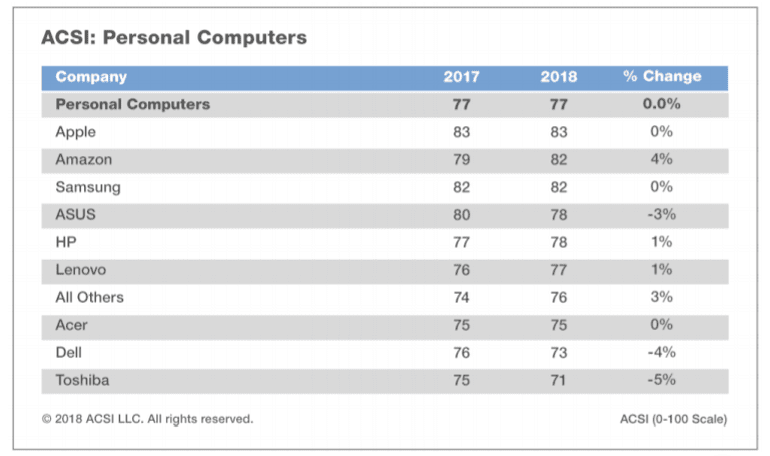
Apple maintained its top spot among PC customer satisfaction with Amazon surging 4 percent and Dell, Asus and Toshiba falling. HP gained 1 percent, according to the 2018 American Customer Sentiment Index (ACSI).

The ACSI, which combines PCs and tablets, takes the pulse of consumers on a 0-100 scale. The ACSI measures consumer sentiment on design, storage, value, and other items. For PCs, Amazon had the largest jump as consumers gave Amazon tablets high scores on design, ease of use and graphics quality. Dell, Toshiba, and Asus scored lower than a year ago due to a bevy of reason. HP, which has balanced design and value well, saw its rating go up 1 percent to 78. Apple leads the category with an ACSI score of 83 compared to the average of 77.

Here's the scorecard overall.


The moving parts in the ACSI rankings for the PC industry are worth noting. Asus fell 3 percent to 78 by targeting the higher end of the market. However, users--especially gamers--are price sensitive. Dell and Toshiba fell because they weren't competing on value. Dell also was dinged on design. Toshiba users panned the PC manufacturer for processor speed and reliability. Microsoft's October 2 Fall Event: What to expect

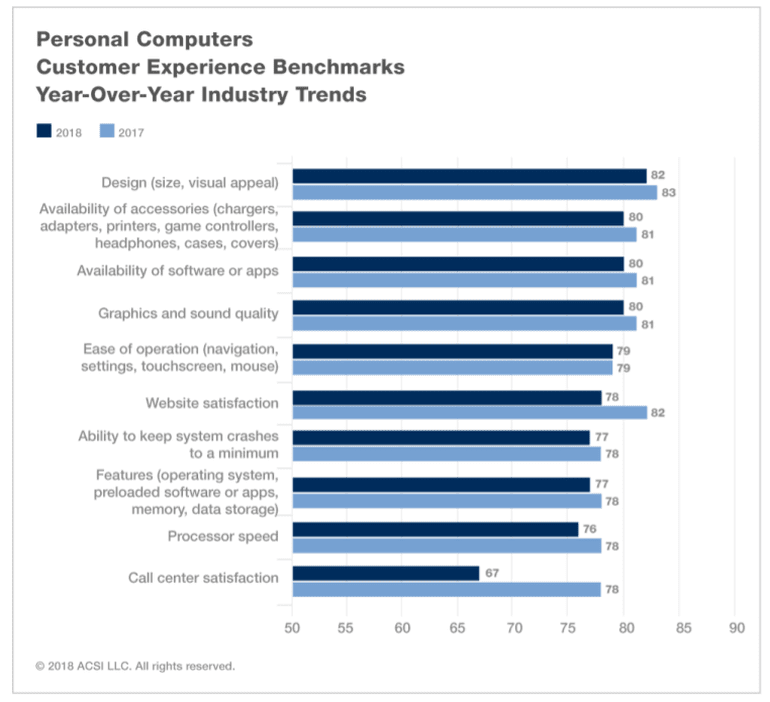
Here's what PC buyers value.


ACSI noted that "most aspects of the PC industry have deteriorated in the eyes of customers."

Design slips to 82, followed by accessories, software and apps, and graphics and sound quality (all 80). There is no change regarding ease of operation (79), but system crashes are now more frequent (77), features have lost some appeal (77), and processor speed is down (-3% to 76).

Important customer touch points show considerable signs of strain. Website satisfaction retreats 5% to 78, and call centers completely reverse the progress they made a year ago, falling further back 14% to 67.

Small business servers: Why and how you can say 'no' to the cloud

On the software front, Microsoft improved its score 4 percent to 79 percent largely due to its regular update schedule. The Windows update strategy improved the scores for other PC software makers.


SOURCE:

Thursday, August 30, 2018

8/30/2018 04:39:00 PM

Dell shows off new Windows 10 2-in-1 Inspiron PCs and premium Chromebook at IFA

The new machines, unveiled to coincide with the IFA conference in Germany, include two new ranges of 2-in-1 computers and a new Chromebook, alongside updates to Dell's existing business and consumer laptops.


Dell has revealed a selection of new mid-range 2-in-1 PCs starting at $460 and packing the latest Intel processors.

The new machines, unveiled to coincide with the IFA conference in Germany, include two new ranges of 2-in-1 computers and a new Chromebook, alongside updates to Dell's existing business and consumer laptops.

DELL INSPIRON 5000


Inspiron 14 5000 Series 2-in-1 Notebook, codename Ben Solo Value

Starting at $459.99, the 14-inch Dell Inspiron 5000 2-in-1 runs on 8th generation Intel Core processors, offers up to 16GB of DDR4 memory and supports fast storage options such as NVMe SSDs connected via the PCIe bus, dual drive configurations and Intel Optane Memory.

Available in two versions, the 5481 and 5482, the 5481 has a 1 366 x 768 screen, while the more expensive 5482 includes a 1920 x 1080 display. The $599.99 5482 also includes a USB Type-C port that supports DisplayPort, providing a single port that can be used to hook up monitors, for charging and to transfer data.

The IPS touchscreen supports a digital Active Pen and if 3D graphics are important it is available with an optional Nvidia MX130 GPU. The 5000 series will be available from October 2nd.

DELL INSPIRON 7000


Inspiron 15 7000 Series (Model 7586) 2-in-1 touch notebook computer, codename Rogue One 15.


If you're willing to pay a bit more, Dell also announced its Inspiron 7000 2-in-1 range, which starts at $879.99.

Available as a 13, 15, or 17-inch machine, the Inspiron 7000 range also includes 8th-generation Intel processors, up to 16GB of DDR4 memory but come with NVMe SSDs as standard.

Although the laptops ship with a 1920 x 1080 resolution IPS touchscreen, the smaller models are also available with an optional 4K display, which offers 72% color coverage and 300 nits typical brightness.

The design of the 13- and the 15-inch versions should stand out, thanks to the three-sided narrow borders that surround the display. Dell says this has been made possible thanks to a new 2.7mm miniaturized webcam that captures clearer and less noisy images in low light.

The 17-inch 7000 2-in-1, has a 17.3-inch FHD IPS touchscreen, and ships with an NVIDIA GeForce MX150 to deliver better graphical performance and Intel Optane memory to boost storage performance.

The 17-inch machine will also support Amazon's virtual assistant Alexa from the autumn.

Dell says the cooling system on the 7000 series has been designed to move hot air away from you or the laptop. The 7000 series will be available from October 2nd.

DELL INSPIRON Chromebook 14


The Dell Inspiron Chromebook 14

Dell also revealed what it called "its first premium Chromebook", the Dell Inspiron Chromebook 14 2-in-1.

The 2-in-1 device includes a 14-inch FHD IPS display with an aluminum, narrow side-bezel design.

Dell is claiming the machine offers up to 15 hours of battery life while running on an 8th Generation Intel Core i3-8130U CPU, 4GB of DDR4 memory and offering up to 128GB of onboard eMMC storage.

Other notable features include USB Type-C ports, a standard backlit keyboard and standard EMR pen with its built-in holder in the laptop's base. The Dell Inspiron Chromebook 14 will be available from October 23rd, starting at $599.

Dell also expanded its XPS and Vostro laptop lines. The XPS family gets a lower-cost option, the XPS 13 with an 8th gen Intel i3 processor, which starts at $899.99. The XPS 13 Developer Edition is now also available with Ubuntu 18.04 LTS.

The XPS 13 2-in-1 has also been upgraded to use Intel's latest 8th generation processors and comes with a dynamic power mode that Dell says can provide up to 15 hours of battery life.

Meanwhile, the Vostro range gets new Vostro 14 and 15 laptops. These laptops again feature the latest 8th-gen Intel Core processors, a USB Type-C port, and an optional single sign-on fingerprint reader.

Reflecting their business focus, the new Vostro machines offer hardware-based TPM (Trusted Platform Module) 2.0, which provides commercial-grade protection and storage for encryption keys to verify a device, as well as BitLocker to configure security settings.

Power usage should also be reduced by Peak Shift, which cuts power consumption by automatically switching the system to battery power during certain times of the day.

The Vostro 5581 will be available November 9, starting at $579, and the Vostro 5481 will be available on January 2, 2019, starting at $669.

This story was originally published on TechRepublic


8/30/2018 12:30:00 AM

Dell’s 2018 Inspiron 2-in-1 laptops Bring More Flagship Features to The Mainstream

Inspiron 5000 and 7000 Series Refreshes Have Arrived

Dell’s 2018 Inspiron 2-in-1 laptops

Announced at IFA 2018 in Berlin, Germany, Dell has completely refreshed its 2018 line of Inspiron 7000 2-in-1 laptops and updated its Inspiron 14 5000 devices. Now, the lineup looks even more like its pricier flagship counterparts in the XPS series.

Starting with the 7000 series of 2-in-1 Inspiron, Dell has updated the entire line with the latest, 8th-generation Intel Core i5 and i7 processors, and has brought a capability that the XPS line has dreamt of for years: a webcam in the proper spot despite a narrow bezel display. The smaller webcam loses out on facial scan biometric login, made up for with a new fingerprint reader.

While the 13-inch version can hold up to 1TB of SSD storage and 16GB of memory, the 15- and- 17-inch versions have options for up to 2TB of hard drive storage with SSDs up to 512GB attached. Intel Optane memory options are available as well, treated as additional RAM in these cases.

All three of these laptops will support Amazon Alexa later as well as Dell’s Mobile Connect phone management app, which now works with iPhones, and will be available starting October 2 in the US. Prices will start at $879 (about £682, AU$1,196) $849 (about £659, AU$1,157) and $1,099 (about £854, AU$1,489) for the 13-inch, 15-inch and 17-inch models, respectively.

Dell’s 2018 Inspiron 2-in-1 laptops


The 14-inch 5000 Series Laptop is all new, too

Dell also updated the 5000 series of 14-inch Inspiron laptops, but instead of putting out features that would make the XPS line jealous, these laptops take the best of the Inspiron 7000 series with a little bit of frill taken off the top.

Starting at $459 (about £356, AU$625) and set to land in the US on October 2, the Inspiron 14 5000 for 2018 will be configurable with 8th generation Intel Core i3 to i7 processors as well optional Nvidia GeForce MX130 graphics. Storage ranges between a solo 128GB SSD and up to a 2TB spinning drive paired with a 256GB SSD. Memory starts at 4GB DDR4 to up 32GB, with Intel Optane storage pairing options included.

All of this comes behind a 14-inch, Full HD touchscreen, and these laptops also feature Amazon Alexa and Dell’s Mobile Connect software. What these laptops do not feature is secure biometric login – that’s reserved for the pricier options. All told, you’re looking at a lineup of flagship laptops in disguise, here just in time for Back to School season and the upcoming holiday shopping season.


Tuesday, May 29, 2018

5/29/2018 04:34:00 PM

Dell refreshes Precision laptops with Ubuntu Linux pre-installed

The fourth generation of Dell's mobile workstations features Intel's latest Coffee Lake processors and optional Nvidia Quadro P600 and Radeon WX graphics.


It's been a little over a year since Dell updated its Precision mobile workstation line, which is notable for its inclusion of the Ubuntu flavor of Linux as an operating system option alongside Windows 10. But last week, the company refreshed the laptop lineup without much fanfare, starting with the entry-level Precision 3530.

Priced from $942.59, the base 3530 configuration ships with Ubuntu Linux 16.04, with the option to upgrade to Windows 10 adding a little over $100 to the cost. It ships with an eighth-generation Coffee Lake Intel Core i5-8400H processor with more powerful Coffee Lake chips available as options. Other specs on the base model include 4GB of RAM, 500GB hard drive, and 15.6-inch 1,366x768 display.

Of course, that's pretty bare-boned for a workstation, which makes that sub-$1,000 price point a bit misleading. For instance, you may not be satisfied using Intel's integrated graphics, which means you'll need to tack on another $89.25 for the Nvidia Quadro P600 graphics card. Likewise, 500 gigs of storage is wholly inadequate for almost any laptop, much less one geared to content creation, so you'll have to spend another $60.07 for a terabyte drive and $77.48 for a 2TB one.

It does include built-in 802.11ac dual-band Wi-Fi, along with the Dell Precision Optimizer software to perform one-click application performance enhancing. Upgrading to a Core i7 processor gives you Thunderbolt support, which is useful if you want to spring for Dell's Business Thunderbolt Dock.

According to Barton George, a Dell Senior Architect in the office of CTO, the 3530 is just the first of four refreshed Precision workstation lines, with the remaining trio will be available soon, though an exact release date and pricing were not disclosed. George says the 5530 family squeezes a 15.6-inch display into a 14-inch chassis for better portability; it will also come in an onxy color option in addition to platinum silver. Its top graphics card moves up to the Quadro P2000.

Rounding out the 15-inch Precision workstations, the 7530 emphasizes power, with support for up to 128GB of RAM, 6TB of solid-state storage, and a choice of Quadro and AMD Radeon WX graphics cards. If your back is strong enough to carry around a 17-inch workstation, Dell will offer the Precision 7730, which offers the performance options of the 7530 with a slightly larger display.

All of the new Precision laptops are RHEL 7.5 certified and include the necessary drivers to run the latest version of Red Hat Enterprise Linux.


Sunday, May 13, 2018

5/13/2018 10:39:00 PM

Go big at the office: This 27-inch Dell monitor is just $125

A bigger monitor won't necessarily improve your productivity; it's just nice.


When it comes to desktop monitors, what's the ideal size?

Bigger is always better, right? Well, kind of. Maybe? Some would argue that unless a big monitor offers an equally big resolution -- something beyond the typical 1,920 x 1,080 -- there's a law of diminishing returns.

Me personally, as my eyes get older and my glasses prescription gets stronger, I'm all in favor of a screen that's just plain bigger.

Like this one: For a limited time, Adorama has the Dell SE2717H 27-inch IPS LED desktop monitor for $124.99 shipped. That's $40 off the regular price, and $25 less than Amazon's price.

(Aside: Recently a rather angry Amazon rep told me in no uncertain terms that the company always has the lowest price. On everything. Always. Without exception. Guess what: exception!)

The SE2717H runs at the aforementioned "full HD" resolution, meaning its expanded physical size won't allow you to cram more windows onscreen at the same time than, say, a 24-inch monitor. It'll merely make everything bigger.

Whether or not that's valuable is up to you -- but seeing as this Dell is priced about the same as most 24-inch monitors, why not level-up?

As you might expect, it's a fairly bare-bones affair, with VGA and HDMI inputs, an anti-glare screen coating and, um, a power cord. (Like I said: bare-bones.)

One important caveat: It lacks VESA mounting holes. If you want to mount it on an arm or stand, you'll need a special bracket (available online for about $30). Needless to say, that kind of offsets your savings, so if mounting is indeed a priority, you might as well just buy a monitor with VESA holes.

Otherwise, you get an LCD that has mostly positive ratings across the interwebs and a three-year warranty. (I wouldn't buy a monitor with anything shorter.)

What do you think?


Wednesday, April 25, 2018

4/25/2018 07:18:00 PM

Dell launches Precision 2-in-1 among business PC refresh

The Precision, Latitude, and Optiflex line-ups are getting new silicon ahead of Dell Technologies World.


Dell's mobile workstation series now includes a 2-in-1 that allows for its display to be folded into its base, dubbed the Precision 5530 2-in-1, with a bevy of updates for its business PCs.

The 5530 2-in-1 is set to arrive with an Intel i5-8305G, i7-8705G, or i7-8706G processor combined with Radeon Pro WX Vega M GL graphics, a 15.6-inch display, up to 16GB of memory, and up to 2TB of NVMe SSD storage. The device's non-replaceable battery is rated at 75Wh, and charged via USB-C.

While set to arrive in July or August, Dell has yet to announce any pricing for the 2-in-1.

The regular version of the Precision 5530 has the choice of either 6-core i9-8950HK and i7-8850H processors, down to 4-core i5-8400H or i5-8300H. Memory-wise, the 5530 can hold up to 32GB, while on the storage front it can have one M.2 NVMe SSD and a 2.5-inch solid-state or spin hard drive. Charging is completed via the regular Dell 4.5mm barrel plug, with a 56Wh or 97Wh-rated battery. For graphics, the 5530 can use built-in Intel HD graphics or Nvidia Quadro P2000 or P1000.

The 5530 is set to cost from $1,450 and is available from May 22.

The company's top-of-the-line 17.3-inch Precision 7730 has the same processor options as the standard 5530, with the 6-core i7-8750H thrown into the mix. For memory, the 7730 can have up to 64GB of 2666MHz DDR4, optionally with ECC, or 32GB of 3200MHz DDR4, and in future up to 128GB of non-ECC 2666MHz DDR4.

Graphics options for the 7730 are Intel HD graphics, Radeon Pro WX 7100 or 4150, or Quadro P5200, P4200, or P3200.

Potentially, the 7730 could store 8TB across four NVMe SSDs, or buyers can go with three M.2 SSDs and a 2.5-inch SATA SSD or HDD. Battery options consist of four-cell 64Wh or six-cell 97Wh units.

Also slated for release on May 22, the 7730 will cost upwards of $1,510.

Meanwhile, in the world of desktops, Dell has also unveiled new silicon for its OptiPlex all-in-ones and towers. The high end of the all-in-one lineup offers processors ranging from i7-8700 down to i3-8100, and the lower end adds in the option of Pentium Gold chips.

Memory choices for the OptiPlex lineup typically top out at 32GB, and storage options are a cornucopia including NVMe, Intel Optane, and spinning rust, with capacity ranging between 2TB down to 128GB.

For the 27-inch 7760, 24-inch 7460, and OptiPlex XE3 tower, customers can choose a Nvidia GTX 1050 GPU. The XE3 can also handle dual Radeon R5 430 or RX550 cards, as well as potentially a bump to 64GB of memory.

Pricing for the 7760 and 7460 start at $1,300 and $1,130, respectively, and once again they are for release on May 22.

Arriving earlier on May 17, Dell has also announced its new Latitude laptops, the $1,000 5591 and $900 5491, packing updated 8th-generation Intel silicon and Nvidia MX 130 graphics.

Lastly, Dell has updated its P-series monitors to include USB-C powered 22-, 24-, and 27-inch models costing $280, $330, and $420, respectively. Also arriving in late June are regular monitors that are approximately $50 cheaper than the USB-C options.

Earlier this year, Dell unveiled a new XPS 13, as well as a refresh of its Inspiron and Alienware lineups.

Last month, Dell posted a fourth-quarter operating loss of $321 million on revenue of $21.9 billion, up 9 percent from a year ago. For fiscal 2018, Dell reported an operating loss of $3.3 billion on revenue of $78.7 billion. The company, including its subsidiaries, now holds almost $53 billion in debt, after paying down $10 billion since it acquired EMC in 2015.


Saturday, April 21, 2018

4/21/2018 04:21:00 PM

Dell changes its approach and goes OS-agnostic insecurity

ZDNet caught up with Dell's data security chief at the RSA Conference to hear how the PC industry is changing its approach to cybersecurity.


Dell's GM of data security, Brett Hansen, spoke with ZDNet's Jason Hiner at the 2018 RSA Conference. They discussed Dell's approach to security in the face of ever-evolving threats.

Watch the video interview above or read the full transcript below.

Hiner: Let's talk a little bit about what you and your team do. You have a very broad and ambitious goal, which is attacking client PC security. Tell us about what you guys do, how you do that.

Hansen: We have two missions. The first is, as you said, client security. How do you make that platform as vulnerability free as possible? Securing, hardening that platform. The second mission is we have a set of agnostic software solutions that are focused on how do you enable the modern workforce? How do you find that balance between security and worker productivity?

Hiner: Very good. Of course, the elephant in the room when you think about security and client security these days is Meltdown and Spectre. That happened last year and caught the industry by surprise a little bit. How has that affected what you do, and what has been the impact, and how are you guys thinking about it now?

Hansen: Meltdown and Spectre, just really intensified the focus of how do we do a better job in the industry of reducing the likelihood of a critical vulnerability like this? At Dell, we have a set of actions across our supply chain, across our software development lifecycle, and across the physical hardware itself to try to compress, limit, reduce. Nothing is ever 100% for sure, but how do you make that likelihood as small as possible?

Hiner: Let's zoom out for just a second. For the past decade, there's been this acknowledgment in the industry that our old model of security, building a very strong wall, and anybody who gets inside then they're okay, they can access anything, has just not worked. It doesn't work in a world with so many mobile devices, with so many telecommuters, people working remote, contractors, IoT, all of these things. We're moving more to this model of perhaps your risk management data focused security, bringing in machine learning and AI, how is that evolving the approach to security not just for you guys, but industry-wide how is the way we're thinking about security evolved?

Hansen: I'm encouraged by the term data-focused because we all get wrapped up in protecting the devices, or the networks, or the data centers, which are merely the vessels that are holding what is really important. We need to be focusing on the data. As an industry, we need to move past our former paradigms of, as you said, creating walls. Things have changed, people have changed, the workforce has changed so that attempting to build walls and restrict the movement of data is going to, ultimately, lead to more leaks. We need to change our paradigm and our thinking from walls to allowing you to protect data wherever it moves, whoever has access to it.

Hiner: What are some of the biggest challenges that you guys face? Of course, the endpoint is the front door to security for a lot of ... the attackers come through. When you're thinking about how you approach security in today's world, how are you guys thinking about it, and what methods are you using to make sure that those things are taken care of, are covered?

Hansen: You hit the nail on the head when you talked about how workers have changed. Last fall, we ran a survey of a few thousand lines of business professionals. Our approach was let's get a better understanding of what the people who are handling data have to say about it. The survey came back with a good news, bad news story. The good news was overall, the workers felt a level of accountability, they acknowledged that data security is important. I have to play a role in that. Great. When it came to actually making the right decisions, the decisions that are going to ensure the risk profile of the company is met, that there is a limitation or limiting the likelihood of data leakage if data policies got in the way of getting their job done, out with data policy.

That's the challenge that we face today is companies are looking to empower their workforce, they're looking to transform, they're looking to drive greater productivity and collaboration. Unfortunately, that comes with the likelihood of increased security risk.

Hiner: There's a lot of effort that's been put on education, and those kinds of things, but what's often missed is giving the worker a reason to care, why they need to understand. Do you run into that? Did your survey bring out anything that talks about the proper ways to educate, and the ways to educate users so that they actually care and have some buy-in to the company's mission, those kinds of things?

Hansen: Again, another piece of good news is two-thirds of the employees that we surveyed said, "Yes, I've had education," yet less than half of them felt like that education really stuck. I think you've hit another really good point here, which is you need to make the education relevant to them. Help it speak to them. One example that we've seen that's been successful is not just having one blanket education across your entire workforce. Start to spend some time targeting. Engineers are different than finance, finance is different than HR, HR is different. The more targeted, the more relevant you can make it to me the more likely I am to care.

Hiner: How about once they are educated, and once they have a realization of what they do, how it affects the overall security what are you seeing? Did the survey talk about sending sensitive information around, that was in there wasn't it?

Hansen: Yeah. I guess, that's the key here, which is education's fantastic. We support it, we do it ourselves. It's not sufficient. The reason is, first and foremost, we're all people, and were motivated to get our jobs done as efficiently as possible. There is a likelihood that a security policy and how we perceive as the most effective way to get the job done will come into conflict and we need to acknowledge that employees are going to ignore security policy.

Hiner: To get their work done?

Hansen: Exactly. You've got to embrace that perspective of education is an element, but it's insufficient on its own.

The survey found that 72% of employees are willing to share sensitive data outside the organization, that's a very large percentage. It could be they have very legitimate reasons. When you think about the new modern workforce, the new modern organization, Dell has hundreds of partners and suppliers, we need to be able to collaborate. Each one of those partners is a trustworthy company, but the ease of being able to distribute information lends itself to someone getting at some sort of negligent action, some sort of nefarious action that could compromise and that's what we need to deal with.

Hiner: Speaking of partners and suppliers there have been some studies that have been done recently that even banks, some of the most secure organizations in the world, they have an incredibly secure front door, but what is left open is those side doors. Those partners that they have, that have that free access in and that's how attackers are often using to attack companies that are ostensibly very secure.

You have some of the same things to deal with, you have partners who put either software or have components in your machines. How do you make sure those are secure and how hard of a job is that?

Hansen: It's a big task, it's a vital task, and it's a task that all of the IT community should be focusing on. First and foremost, we have very clear policies around our expectations of our partners, around component security, physical security, software limit lifecycle. We provide those, we back those with education, we back those with assessments. It can't just be simply, "I told you to do this," and then turn away. You have to back it up with some real work in a collaborative fashion.

The second is trust only goes so far. You've got to go and double check.

Hiner: To verify?

Hansen: Trust and verify, pen testing, reviews on a regular basis. One of the most important elements though, going back to people, is ensuring that everyone involved in the development of the product is aware of security, is thinking about it, it's top of mind. Safety first. Like you see it at all the construction sites around San Francisco, the big signs of safety first. Safety first should be part of how we develop product and software code. The overall industry needs to embrace that in a much more thoughtful manner.

Hiner: You have your own pen testers that are doing some audits and verifications of these third parties that are connecting with you. How often do you guys go back to a partner and say, "Look, this is not meeting the standards? We need you to improve"?

Hansen: We're always going back to partners and talking with them about how they can improve, and we also point to ourselves as an example. You mentioned pen testing, we go a step beyond that. We have the same folks who are doing the pen testing then spend time, not a day or an hour, but weeks with our development team helping them learn from the things that they could do better.

I wouldn't call them mistakes because it's not mistaken, it's how do I continue to enhance my skills? How do I continue to do a better job of protecting through good software development? Our teams will come back, they'll sit down, they'll train them, they'll talk about what hackers are looking for, all the nuances. It's a culture that has to be developed. It can't just be something you say, "Hey, safety's important," and you move on. It is something you think and breathes every day, so it's not an easy fix.

Hiner: Those pen testers find all the ways that ... essentially acting like white hat hackers, find a way to get in, breakthrough and then they sit down with the developers and tell them like, "Here's how we did it. Here's how we got through."

Hansen: Next time you're doing this you're going to be one step better at this. It's always these continual seeking improvements. How do we keep driving improvement? Again, we're never going to get to the point of saying, "Oh yes, there will never be any sort of vulnerability." That's not a possibility. Let's do everything in our power to try to reduce that and that includes investing in people, and policy policies, and tools.

Hiner: Very good. For Dell and for the machines that you make, one of the things that we see is as much as there's been a focus on mobile and there's been a focus on the internet of things most knowledge workers are still sitting down at a computer every day, at a laptop or a desktop, increasingly mostly laptops. What are the things that are different now than they were even a decade ago in terms of the way that you guys secure your machines? What are the things that you guys have learned, and the ways that you've been able to move this forward, and move security forward?

Hansen: The number one thing that we've embraced is yes, we need to do all we can to secure the platform, but when it comes to the worker interaction with data Dell has an agnostic portfolio of software that works across Dell devices, old and new, works across HP, Lenovo, Mac, Android. Why? As we talked about earlier, data is going to move. The expectation of today's worker is, I'm going to have multiple pieces of glass some are going to be company-owned, some are going to be personally owned. I want access to my application, to my data regardless of what the piece of glass I'm using, regardless of location I'm at, and that creates an inherent security risk.

We've embraced a portfolio of software, which is focused on how do I protect data at rest, in motion, and in use regardless of location, regardless of who is using it? That's the new world that we live in.

Hiner: Dell Software Solutions that aren't just about securing Dell PCs, there are about tracking your data wherever it goes on any device, every device?

Hansen: Yes. That's an important element because the world's not proprietary anymore, it's not even just on Microsoft. It goes beyond just one OS. We need to embrace this new modern paradigm of data is what matters. Don't let that get caught in devices or operating system, let's get caught up in as data moves and flows, as I send you a piece of data I still want to control it. I don't want you to be able to send it to 26 people without my permission, it's my data and that's important to me as a business. We need to keep driving that perspective and that philosophy home.

Hiner: What does that look like in terms of a solution? Is that an installed solution on each device? Is it a way to encrypt the data? How does that work practically if I'm a company, and I want to install that solution?

Hansen: You purchase it just like any other software-based solution. For your employees, we load an agent, as an employee want to control data, but not create too much friction, sorry. If I was to send you a document from my Dell account to your account I can send it to you, there's a little bit of friction that says, "Do you really want to send this? This person's not a part of Dell." I say, "Yes," you automatically have access to that document. Again, the company still controls it, so I have data rights management over the top of this, so I can control, do you print, do you copy, do you paste, do you expire, do you embargo. I can prevent you from sending it to someone else because maybe it's just for your eyes only.

The most important element is I can monitor what's happening with that document. Think of the whole new world of cyber intelligence that opens up as we start to look at every document being a source of intelligence. Where is it? Who's accessing it and what are they trying to do? You bring that into a broader sim and now you can really start to identify what's happening in your world focusing on the important stuff, data, not endpoints, networks, data centers.

Hiner: Your own solution, does it work across solutions, Office 365, Google Docs?

Hansen: Absolutely. It has to because that's, again, the new world that we live in. That's why what I think is important is taken, even though I know Dell is a major manufacturer, we also are focused on how do we help our customers transform? We've heard loud and clear from our customers they want to empower their workforce, they want to be more collaborative and flexible. They love the idea of an employee being able to pick up a piece of glass and access the applications and data they need. That's a great story, but you have to do it securely.

Hiner: That push and pull between efficiency and security, where does that net out in terms of what the industry needs to do to really move forward? We know we've got a security problem clearly, security has been getting worse and worse, incidents have been increasing. Where do you feel like the industry needs to go in terms of managing that convenience versus security, and what can be done to improve it?

Hansen: I talk to customers almost on a daily basis and from the interaction, I have from seeing best practices, from seeing some very worst practices I usually come out with three key themes. First and foremost, have a strategy specifically for your workforce in your ecosystem. Your own employees, your partners, your contractors, supplementals. What is my strategy? So many companies they build body security tools, they implement them, and they're like, "Well, this is a working," because it wasn't aligned to a broader strategy. What is your strategy? Are you a manufacturing company? Are you going to have large numbers of partners and suppliers? Are you going to be more of a holistic, standalone, isolated organization? That's going to influence the policies and then, ultimately, the tools.

Once you have your strategy then it's your policies. Make sure you clearly articulate those, make sure your employees understand them, as you called out earlier make sure they're relevant to the employee. I'm not just broadcasting this dictatorial set of actions, I'm helping inform you of how you can do a better job as an employee.

Then, third is the tools. For the tools, it's all about moving away from walls and moving towards protecting the data. Protecting the data's not building a wall, it's acknowledging it's going to move, it's going to be shared, and that's a good thing, but do it in a secure manner.

Hiner: Very good. Moving from, again, this network-centric security model to that data-centric security model not even just in the cloud, not even just on mobile devices, but even from a desktop perspective as well.