Breaking

Showing posts with label Microsoft Outlook. Show all posts

Friday, March 29, 2019

3/29/2019 10:44:00 PM

Microsoft is making Outlook.com more intelligent

Save time by being smart


If you use Microsoft’s online email service Outlook.com, then you’ll be pleased to know that the company will be adding new ‘intelligent’ features to its email and calendar tools to make them more powerful and to hopefully save you some time as well.

In a blog post announcing the new features, Microsoft explains what makes them intelligent. First of all, there are Meeting Insights, which will use Microsoft Graph technology to allow Outlook to recommend relevant information for the upcoming meeting. So, it could gather together relevant Office documents that you can refer to in the meeting.


  • Tame your email: how to achieve Inbox Zero in Gmail and Outlook
  • The best email provider of 2019
  • Best email marketing software of 2019


According to Microsoft, “The information includes files that have been shared with you in an email, public files on SharePoint or OneDrive, emails you’ve had on the meeting topic, content shared during the meeting, meeting notes, and post-meeting content,” and the information will be uniquely tailored for each person.
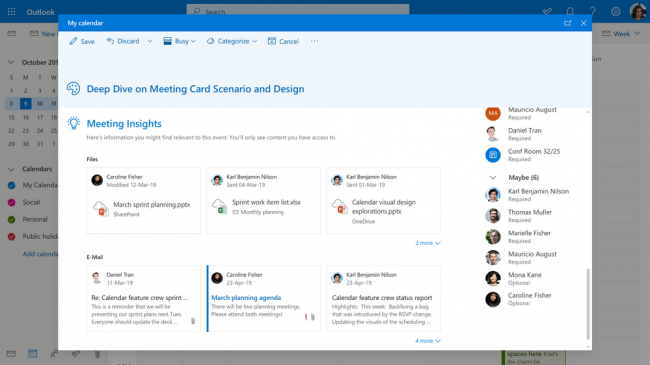

Meeting Insights will automatically provide documents and information for your meetings (Image Credit: Microsoft)

Making meetings smarter

Microsoft has also added the ability to quickly schedule a meeting as part of its suggest replies feature. Suggested replies are suggestions that Outlook provides you at the bottom of messages you receive so that you can quickly send a reply without typing it out – much like in Gmail.

Now, if Outlook detects that an email is suggesting a meeting, you can click ‘Schedule a meeting’, and a meeting form will open with pre-populated information.

When scheduling a meeting, Outlook now offers ‘Smart time suggestions’. This checks the calendars of the people involved with the meeting, then suggests days and times when all attendees will be free.


Suggested replies can now detect if you're planning a meeting (Image credit: Microsoft)

Finally, Outlook.com will also offer suggested locations for meetings, including conference rooms in your office or at a public place. Outlook will also show the address, opening hours and contact information for the location.

These are some nice additions that will help business users more than home users, and they won’t be available to all Outlook.com users straight away, with Microsoft rolling them out while it tests them.

However, as some people have noted, these feature means Microsoft is gathering even more information from your emails and calendars. While some people may think this is a price worth paying for the convenience of the new features, others may be dismayed at the company reading your emails. After all, the reason why many people left Gmail was due to Google’s snooping.

The best free email client 2019


READ MORE:

Saturday, September 8, 2018

9/08/2018 04:39:00 PM

Microsoft Readies Test Versions of Redesigned Outlook for Windows, Outlook on the Web

Microsoft is rolling out interface updates to its Outlook for Windows and Outlook on the Web versions of Outlook. It also is delivering Skype call recording for many versions of Skype.


Microsoft is making available to testers redesigned versions of its Outlook for Windows app and Outlook on the Web variant. Those using the version of the Outlook app that will be part of Office 2019 won't see these coming changes, Microsoft officials said on September 4.

Microsoft announced earlier this summer that it would be giving its so-called Office 365 and Office.com (a k an Office Online) apps a makeover. At that time, Microsoft officials said they'd begin rolling out changes to the interface of Outlook, Word, Excel and PowerPoint "over the coming months."

The biggest coming changes announced at that time were an updated and simplified Ribbon, icon refreshes and new ways to see changes coming soon to Office.

The outlook for Windows users will start seeing these updates if they are part of the Office Insider program and/or working with Monthly Channel (Targeted) releases as of September. After that, Microsoft will broaden availability to more Office users, based on tester feedback.

Those using Outlook on the Web will see an opt-in toggle -- like the one that Office.com testers got -- starting September 10, which will give them a way to "Try the new Outlook."There will be a number of features not immediately available to Outlook on the Web testers when that new version is available as of September 10. These missing features, which span Mail, Calendar and People, are listed in this blog post.

Yes, there are too many different versions of Office and yes, this is confusing to try to keep straight.

In other app-delivery news of a product with too many different versions, Microsoft announced today that the promised Skype call recording feature is rolling out to users of many, but not all, of its Skype variants. The Universal Windows Platform (UWP) version of Skype for Windows 10 isn't getting this feature currently; there's no date as to when/if it will. Users of the other Skype versions will get call recording "over the coming weeks."

Microsoft also announced late last week that it's redesigning the Skype client app (yet again)


Wednesday, September 5, 2018

9/05/2018 10:31:00 PM

Microsoft Revamps Outlook for Windows and Online

A better email experience


Microsoft has revealed a suite of changes to its Outlook email client, both the Office application and Outlook.com webmail service, with the aim of making it easier and more intuitive to use.

The Outlook application for Windows, which comes as part of Microsoft Office, will soon feature a more streamlined Ribbon interface. For anyone who's used Outlook and been frustrated by the cluttered Ribbon bar that often hides useful tools and features when you need them (we’re talking from experience here), this will be a welcome move.

The Folders pane has also been rejigged so that folders are easily accessible while you’re working, which is good news for people who like to keep their inboxes organized. New messages will also be easier to spot and read, with the reading pane getting larger titles and smaller headers, leaving more room to display the email content. Responding to emails should be easier and quicker as well.

The calendar in Outlook is also getting improvements, making it easier to add attendees to a meeting, and Outlook will also be able to check the availability of meeting rooms in your organization.

Web improvements

The Outlook.com website is also getting improvements, with the search box becoming more useful by highlighting people you regularly interact with. A new tab has also been added which lets you find files quickly and easily, rather than trawling through emails to find a specific attachment.

Outlook.com is also getting 'smart replies', suggesting a selection of quick responses to emails based on their content, which you can send with one click – Gmail has had a similar feature for a while now.

The calendar in Outlook.com is also getting similar features to the Windows Outlook app in the form of meeting room availability, and new icons that give you quick and easy-to-digest information about upcoming events.

These are some worthwhile enhancements for both versions of Outlook, and it shows that Microsoft is keen to keep its services competitive in the face of popular alternatives such as Thunderbird and Gmail.


Wednesday, April 25, 2018

4/25/2018 12:33:00 AM

Best Email Client Of 2018

Stay organized and on top of your inbox


Email remains an important form of communication, more formal than a text, tweet or instant message, while obviously being much faster than ‘snail mail’, which may explain why email volume continues to increase. Indeed, a recent estimate claimed that something like 269 billion emails are sent daily.

Most of us likely have multiple email accounts with online providers such as Gmail, Outlook.com or Yahoo, which can be used online via their corresponding websites (also known as webmail), or by using mobile apps.

Managing and coordinating multiple accounts can quickly become a chore, and that is where an email client becomes a useful solution to sync all your messaging in one place. An email client can also offer additional features, such as enhanced security, or the ability to back up messages. We’ve picked out six of the best email clients in this article.

We’ve also chosen the best free email client if you don’t want to pay anything

1. Microsoft Outlook
Microsoft’s classic email client


  • Trusted by businesses worldwide
  • The ‘gold standard’ of email clients
  • Integrated with Microsoft Office
  • Not cheap


Microsoft’s Outlook is the de facto email client for most businesses and enterprises and has been around for decades, with its origins dating back to MS-DOS. Obviously, it has tight integration with other Microsoft services, and that takes email beyond the simple exchange of messages.

Outlook has the advantage of being fully integrated with the Outlook Calendar, making it a snap to share calendars to coordinate meetings. This integration also extends to Outlook Contacts. Outlook is supported for the Windows platform, but also across the mobile platforms of iOS and Android as well.

Microsoft Outlook is available as part of the Microsoft Office suite, which can be purchased as the standalone Office 2016, or the subscription-based Office 365. A single user subscription to Office 365 Personal can be purchased for $6.99 (around £5, AU$9) per month or $69.99 (around £50, AU$90) for a full year.


2. Mail for Windows 10
The email client that’s good enough to come with Windows


  • Built into Windows 10
  • Integrates with Windows Calendar
  • Supports multiple email providers
  • Less well-featured


While Outlook is a stalwart of the business world, Microsoft has long realized that it is overkill for many home users, so there’s a lightweight email client built into Windows. Way back when, this client was Outlook Express, but it has since evolved and in the latest version of Microsoft’s desktop operating system, it’s known as Mail for Windows 10.

For any Windows user, the Mail for Windows 10 client is an obvious choice, as when you log into Windows 10 with a Hotmail, Live, or Outlook.com address, the account is already added to the email client.

It can also work with other popular accounts, including Yahoo, Gmail, and iCloud. Mail for Windows 10 has a useful feature known as Quick Actions, which, for example, allows the user to easily flag or archive a message. It’s also integrated with the Windows Calendar app.


3. eM Client
A full-featured alternative email client

  • Supports chat
  • Boasts encryption
  • The modern interface requires Pro product for more than two accounts


This alternative email client is trusted and used by Fortune 500 companies which include Avis, McDonald’s and Toyota.

It offers a wide array of features, including a calendar, contacts and chat. Support is provided for all the major email services including Gmail, Yahoo, iCloud and Outlook.com. The latest version of eM Client (7.1) also offers PGP encryption, live backup, and auto-replies for Gmail.

There is a free tier, but you need the Pro version for commercial use, and that also gives you VIP support and unlimited accounts (the free product is limited to two email accounts). The Pro version will set you back $49.95 (or £29.95 in the UK, which is around AU$55).


4. Mailbird Pro
The email client that bristles with app integrations

  • Loads of built-in apps
  • Affordable 
  • Customizable interface
  • Lacks filters support


Mailbird Pro is an email client that promises to “save time managing multiple accounts,” and to make your email “easy and beautiful”.

While beauty may be in the eye of the beholder, as they say, it’s undeniable that Mailbird Pro offers many free themes to make email a more enjoyable and customizable experience.

Unlike some more Microsoft-centric email clients, Mailbird Pro supports a diverse range of integrated apps, including WhatsApp, Google Docs, Google Calendar, Facebook, Twitter, Dropbox and Slack, all making for a better-streamlined workflow. However, one downside to bear in mind here is that there’s no support for filters or rules to organize your inbox.

The annual cost of Mailbird Pro is $9 (around £6, AU$12) for an individual and $20 (around £14, AU$26) for a business user.


5. Inky
The anti-phishing email client

  • Built around security 
  • Finds phishing emails that other clients miss
  • Less focus on non-security features


Inky is an email client that focuses on security, using “sophisticated AI, machine learning and computer vision algorithms” to block all manner of phishing attacks which might otherwise get through.

This client uses an ‘Inky Phish Fence’ that scans both internal and external emails to flag phishing attempts. The proprietary machine learning technology can literally read an email to determine if it has phishing content, and then is able to quarantine the email, or deliver it with the malicious links disabled. It also takes things a step further and offers an analytics dashboard, which allows an administrator to see patterns of attacks based on dates, or targeted users.

The Inky email client does offer a free trial, but sadly, pricing details aren’t made available on the Inky website. However, the site does note that pricing is per mailbox per month on a subscription, with volume discounts available.


6. TouchMail
Visual-oriented email with added features

  • Touch-friendly
  • Color-coded emails
  • Windows only


TouchMail is an email client that simplifies email by making it more visual. This also makes it easier to use on a touch-based mobile device.

The goal of TouchMail is to aggregate multiple email accounts together, in a single visually attractive interface which is user-friendly. It lets you see all of the day’s emails in one place, with messages color-coded by the sender for easy identification. Emails from top senders can be easily sorted and managed, too.

This client is available for the Windows 10 platform, but not for iOS or Android, sadly. TouchMail can be grabbed from the Microsoft Store, and normally retails at $29.99 (around £22, AU$39), although at the time of writing there is a sale on that gives you a third off the asking price.


Friday, August 11, 2017

8/11/2017 03:08:00 AM

Microsoft launches new Outlook.com beta; begins testing new components

Microsoft is opening an open beta program for Outlook.com and giving members a quick take a gander at some conceivable new components.


Microsoft is commencing another open beta program for its Outlook.com web mail benefit on August 8. 

Clients who are occupied with experimenting with some potential new Outlook.com highlights before they are taken off to the standard can pick in by exchanging the "Attempt the Beta" flip situated on the upper right corner of their Outlook.com inboxes. Clients will have the alternative to change back to the non-beta Outlook.com whenever. 

Not all Outlook.com clients will see this select in instantly, Microsoft authorities said. The take off will be a staged one beginning today. The beta pick in ought to be accessible to all Outlook.com clients around the world "in the following couple of weeks," authorities said. 

The individuals who select into the beta will get the chance to experiment with a few potential new elements instantly. Among these new elements beta analyzers will see are a redesigned seek highlight, a more "present day discussion style" interface and another general plan that is intended to enable clients to "see read and connect records speedier," as per Microsoft's August 8 blog entry. Records and photographs will have the capacity to saw the client's discussion list. 

The present Outlook.com beta likewise will enable clients to customize their inbox with most loved individuals and envelopes. Prevalent emojis and GIFs will be accessible straightforwardly inside Outlook.com.


Microsoft likewise is hoping to give "a more intelligent inbox" with the new plan. The inbox will demonstrate "Speedy Suggestions" as clients sort, making it simpler to include data eateries, flights, group plans, and so on. Microsoft has been working for quite a long time on "Bingifying" its Office applications by building seek specifically into them. 

Moreover, all photographs sent or got will be in a solitary place, encouraging how they're overseen, reviewed and sent. 

Microsoft will be including all the more new beta components in the following couple of months, including updates to log book and individuals, as per the present blog entry. Toward the finish of the assigned beta time frame, Microsoft will choose whether new components ought to be presented, refined or dropped in light of client input, authorities said. 

In case you're asking why Microsoft didn't make this Outlook.com beta piece of its Windows or Office Insider programs - particularly given that Microsoft has been bringing Outlook.com and its other local Outlook applications nearer together - there is a reason, a representative said. The Outlook.com beta "is a genuine beta program with a constrained life expectancy," the representative said (without determining what that traverse will be), while the Insider testing programs are continuous.